
There are several functions to obtain information about files, such as the last modification date, file size, or file attributes. The following program demonstrates how to use these functions:
Sub GetFileInformation()
    Dim fileName As String
    Dim fullFileName As String
    Dim folderPath As String
    Dim i As Integer
    ' Set the folder path correctly
    folderPath = "C:\Users\POPOLY\Desktop\"
    If Right(folderPath, 1) <> "\" Then
        folderPath = folderPath & "\"
    End If
    With ThisWorkbook.Worksheets("Sheet1")
        .Activate
        i = 1
        fileName = Dir(folderPath & "*.*")
        Do While fileName <> ""
            fullFileName = folderPath & fileName
            ' Vérifie que le fichier existe vraiment
            If Dir(fullFileName) <> "" Then
                On Error Resume Next ' Ignore temporairement les erreurs
                ' Write file info
                .Cells(i, 3).Value = fileName
                .Cells(i, 4).Value = FileDateTime(fullFileName)
                .Cells(i, 4).NumberFormatLocal = "dd.mm. hh:mm"
                .Cells(i, 5).Value = FileLen(fullFileName)
                .Cells(i, 5).NumberFormatLocal = "0 ""Byte"""
                .Cells(i, 6).Value = IIf((GetAttr(fullFileName) And vbReadOnly) > 0, "Yes", "No")
                On Error GoTo 0 ' Réactive les erreurs normales
                i = i + 1
            End If
            fileName = Dir ' Next file
        Loop
    End With
End Sub
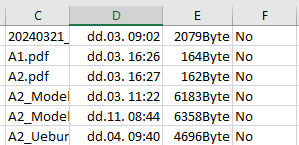
Explanation:
As in the previous example, the code searches for files with the .txt extension.
For the subsequent function calls, the full filename including the path is stored in fullFileName.
- The function FileDateTime() returns the date and time of the last modification of the file.
- The well-known function FileLen() retrieves the file size in bytes.
- The function GetAttr() obtains the file or directory attributes. It returns a number containing all attributes combined as bits. To check for a specific attribute, you perform a bitwise comparison with the And operator.
If the result of the comparison is greater than zero, the attribute is present.
In this example, the code checks whether the file (or directory) is read-only by comparing against the constant vbReadOnly.
Other useful constants include:
- vbHidden: The file is hidden.
- vbSystem: The file is a system file.
- vbDirectory: It is a directory.
- vbArchive: The file has been changed since the last backup.