
An example featuring the Retry and Cancel buttons, together with a critical warning icon, is shown in Figure.
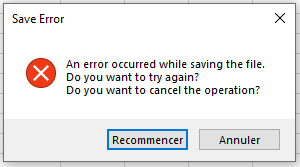
The corresponding code is:
Sub MsgBoxRetryCancel()
    If MsgBox("An error occurred while saving the file." & vbCrLf & _
              "Do you want to try again?" & vbCrLf & _
              "Do you want to cancel the operation?", _
              vbRetryCancel Or vbCritical, _
              "Save Error") = vbRetry Then
        MsgBox "You chose to try again"
    Else
        MsgBox "You chose to cancel the operation"
    End If
End Sub
Explanation:
The Retry and Cancel buttons are combined with an icon that visually signals a critical warning.