
Numbers can be rounded in various ways. Using the worksheet functions Round(), RoundDown(), and RoundUp(), you can round, round down, or round up to any specified number of decimal places or digits before the decimal point. You can also perform traditional rounding to whole numbers.
The worksheet function MRound() allows rounding to the nearest multiple of any number. For example, rounding to the nearest multiple of 5 will produce a number ending in 0 or 5.
Below is an example demonstrating different ways to round a number:
Sub RoundingExamples()
    Dim num As Double
    num = 300000 / 7
    With WorksheetFunction
        MsgBox "Number: " & num & vbCrLf & _
               "Rounded to 3 decimal places: " & .Round(num, 3) & vbCrLf & _
               "Rounded down to 3 decimal places: " & .RoundDown(num, 3) & vbCrLf & _
               "Rounded up to 3 decimal places: " & .RoundUp(num, 3) & vbCrLf & _
               "Rounded to 3 digits before the decimal point: " & .Round(num, -3) & vbCrLf & _
               "Rounded to nearest multiple of 5: " & .MRound(num, 5)
    End With
End Sub
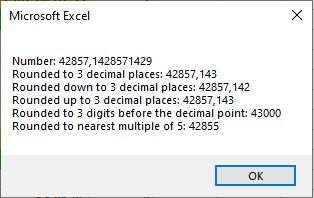
Explanation:
For Round(), RoundDown(), and RoundUp(), the second parameter specifies the number of decimal places to round to. If the value is negative, the rounding applies to digits before the decimal point. If the value is zero, the number is rounded to the nearest whole number.
For MRound(), the second parameter specifies the multiple to which the number is rounded.