
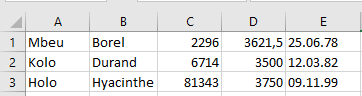
Code example:
Sub ActionQuery()
    Dim cn As New ADODB.Connection
    Dim SQLCommand As String
    Dim affectedRecords As Integer
    On Error GoTo ErrorHandler
    Set cn = New ADODB.Connection
    cn.ConnectionString = _
        "Provider=Microsoft.ACE.OLEDB.12.0;Data Source=" & _
        ThisWorkbook.Path & "\salary.accdb;"
    cn.Open
    SQLCommand = "UPDATE personen SET gehalt = gehalt * 1.05"
    ' MsgBox SQLCommand ' Uncomment for debugging
    cn.Execute SQLCommand, affectedRecords
    cn.Close
    Set cn = Nothing
    MsgBox "Number of records updated: " & affectedRecords
    Exit Sub
ErrorHandler:
    MsgBox Err.Description
    Set cn = Nothing
End Sub
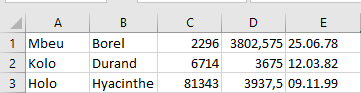
As an example of an action query, consider the following task: increase all salaries by 5%. After running the update and re-importing the table from MS Access, the updated records should appear as shown in next Figure.
Explanation:
- The Execute() method is used to run action queries and can accept a second parameter to return the number of affected records.
- In this example, the second parameter affectedRecords stores how many records were updated by the query.
- The return value of Execute() is not needed here since no Recordset is expected from an UPDATE statement.
- The SQL command UPDATE personen SET gehalt = gehalt * 1.05 can be broken down as follows:
- UPDATE … SET …: SQL syntax to update a table and assign new values.
- personen: The name of the table to update.
- gehalt = gehalt * 1.05: Expression that increases the salary field by 5%.
- Note that SQL uses a decimal point (not a comma) to separate decimal places.
- For confirmation, the number of updated records is displayed, as illustrated in Figure 9.45.