
When displaying a « Save As » dialog, you can preset a default filename for the user.
Example:
Sub SaveFileAsDialog()
    Dim success As Boolean
    Workbooks.Add ' Create a new workbook
    ' Show the built-in Excel "Save As" dialog with a preset filename
    success = Application.Dialogs(xlDialogSaveAs).Show(arg1:="C:\Users\POPOLY\Desktop\Doc\Document.txt")
    ' If the user cancels the dialog, show a message box
    If Not success Then MsgBox "Save operation was cancelled"
End Sub
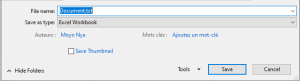
Explanation:
- The constant xlDialogSaveAs calls the built-in Excel « Save As » dialog box.
- The argument « C:\Users\POPOLY\Desktop\Doc\Document.txt » sets the default filename shown in the dialog.
- If the user clicks Save, the new workbook is saved with the given name.
- If the user cancels the dialog, the variable success is set to False and a message box informs the user that the save was cancelled.