
The Dir() function can be used both for searching files and for processing a list of files. In the first example, it is used to check whether a file named test.txt exists in the folder where the application resides:
Sub SearchFile()
    Dim filePath As String
    filePath = "C:\Users\POPOLY\Desktop\Person.txt"
    If Dir(filePath) <> "" Then
        MsgBox "File Person.txt found"
    Else
        MsgBox "File Person.txt not found"
    End If
End Sub
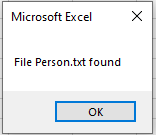
Explanation:
The Dir() function returns the name of a file that matches the specified search pattern. You can use wildcards such as ? (for a single character) or * (for multiple characters).
In this example, a specific filename is searched for without any wildcards. The return value is either the filename (if it exists) or an empty string (if the file does not exist).
The second example demonstrates how to list all files matching a certain pattern:
Sub ListFiles()
    Dim fileName As String
    Dim output As String
    Dim folderPath As String
    folderPath = "C:\Users\POPOLY\Desktop\"
    fileName = Dir(folderPath & "*.txt")
    output = ""
    Do While fileName <> ""
        output = output & vbCrLf & fileName
        fileName = Dir
    Loop
    If output = "" Then
        MsgBox "Aucun fichier .txt trouvé."
    Else
        MsgBox "Fichiers trouvés :" & output
    End If
End Sub
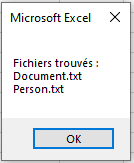
Explanation:
Initially, the Dir() function is called with a parameter specifying the search pattern — here, all files with the .txt extension. The name of the first file matching this pattern is stored in the variable fileName.
Then, a loop begins. If a file was found, the variable fileName is not empty, so the loop executes.
Each found filename is concatenated to an output string variable.
Inside the loop, Dir() is called again without any parameter. This instructs the function to continue searching for the next file matching the original pattern.
The loop continues until all files matching the pattern have been retrieved.
Finally, all collected filenames are displayed in a message box.