
Setting Font Properties in Excel VBA
The following VBA procedure demonstrates how to customize the font formatting of a cell. You can define the font name, boldness, italic style, underline, size, and color using the Font object.

VBA Example: Formatting Cell Font
Sub FormatFontProperties()
    ' Activate the worksheet named "Tabelle2"
    ThisWorkbook.Worksheets("Tabelle2").Activate
    ' Set the font of cell C1 to Tahoma
    Range("C1").Font.Name = "Tahoma"
    ' Make the font bold
    Range("C1").Font.Bold = True
    ' Make the font italic
    Range("C1").Font.Italic = True
    ' Underline the font
    Range("C1").Font.Underline = True
    ' Set the font size to 20
    Range("C1").Font.Size = 20
    ' Set the font color to red
    Range("C1").Font.Color = vbRed
End Sub
Explanation of the Procedure:
- Activating the Worksheet:
- The procedure begins by activating « Sheet2 » to make sure all formatting changes apply to the correct sheet.
- Using the Font Object:
- Range(« C1 »).Font gives access to all font-related properties for cell C1.
- Each property modifies a specific aspect of the cell’s text appearance.
- Font Properties Used:
| Property | Function | Example Value |
| .Name | Sets the font family | « Tahoma » |
| .Bold | Makes text bold if set to True | True or False |
| .Italic | Applies italic style | True or False |
| .Underline | Underlines the text | True or False |
| .Size | Sets the font size in points | 20 |
| .Color | Defines the font color | vbRed |
You can simplify the syntax using a With block, as shown in the optimized version above.
Font Color Options:
- In the example, the color red is applied using the VBA color constant vbRed.
- Alternatively, you can use the RGB() function for custom colors:
- Range(« C1 »).Font.Color = RGB(255, 0, 0)
-
- This sets the text color to red by specifying full red (255), and no green or blue (0).
| Function/Constant | Description |
| vbRed | Built-in constant for red |
| RGB(r, g, b) | Custom color defined by RGB values |
Result Overview:
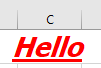
- Cell C1 displays the word « Hello » (or another value) using:
- Tahoma font
- Bold + Italic + Underlined
- Font size: 20 pt
- Font color: Red