
SmartArt graphics allow you to quickly and clearly represent relationships, processes, or hierarchies.It was created via the menu: INSERT • SMARTART • LIST • SIMPLE BLOCK LIST. Afterwards, the text was modified through the text pane, and the graphic was repositioned.
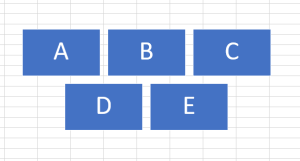
In VBA, a SmartArt graphic is treated as a group of shapes. However, the properties of these shapes can only be read, not modified.
The following program outputs the positions of the individual blocks:
Sub ReadSmartArtPositions()
    Dim i As Integer
    Dim s As String
    Dim Sh As Shape
    ' Select the first SmartArt object
    Set Sh = ThisWorkbook.Worksheets("Sheet9").Shapes(1)
    ' Collect the Top and Left positions of all group items
    For i = 1 To Sh.GroupItems.Count
        s = s & Int(Sh.GroupItems(i).Top) & _
            " " & Int(Sh.GroupItems(i).Left) & vbCrLf
    Next i
    MsgBox s
    Set Sh = Nothing
End Sub
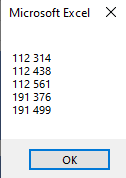
Explanation:
The GroupItems collection contains all elements within the SmartArt group.
Each individual element of the group can be accessed by its index.
The Top and Left properties of each block are gathered and displayed in a message box, as illustrated in Figure.