
The following procedure fills a one-dimensional static integer array with values, sorts it using the popular and relatively efficient Bubble Sort algorithm, and then outputs the sorted array:
Sub SortArray()
    Dim T(1 To 7) As Integer
    Dim i As Integer
    Dim Swapped As Boolean
    Dim Temp As Integer
    ThisWorkbook.Worksheets("Sheet1").Activate
    Randomize
    ' Fill the array with random values
    For i = 1 To 7
        T(i) = Rnd * 10 + 20
    Next i
    ' Sort the array using Bubble Sort
    Do
        Swapped = False
        For i = 1 To 6
            If T(i) > T(i + 1) Then
                Temp = T(i)
                T(i) = T(i + 1)
                T(i + 1) = Temp
                Swapped = True
            End If
        Next i
    Loop While Swapped
    ' Output the sorted array
    For i = 1 To 7
        Cells(i, 1).Value = T(i)
    Next i
End Sub
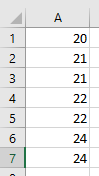
Explanation:
- The Bubble Sort algorithm repeatedly traverses the array from the first to the penultimate element.
- Each element is compared to its immediate next element.
- If two adjacent elements are out of order (in this case, if the current element is greater than the next), they are swapped using a temporary variable.
- This causes smaller elements to « bubble up » toward the start of the array, like air bubbles rising in water—hence the name.
- Here the sorting is ascending, so smaller values rise to the top.
- To sort in descending order, simply change the condition in the If statement to T(i) < T(i + 1).
- When a full pass through the array completes with no swaps, the boolean variable Swapped remains False and the loop ends, indicating the array is sorted.