
In Module1, you will find the procedure VocabularyTest(). It contains the entire test workflow:
Vocabulary Test Procedure (English version)
Sub VocabularyTest()
    ' Define variables
    Dim UserInput As String
    Dim LanguageCombo As Integer
    Dim Language1 As String
    Dim Language2 As String
    Dim Vocab1 As New Collection
    Dim Vocab2 As New Collection
    Dim RowIndex As Integer, Col1 As Integer, Col2 As Integer
    Dim RandomIndex As Integer
    Dim Feedback As String
    Dim PromptText As String
    Dim TestEnd As Boolean
    ' Select language combination
    Do
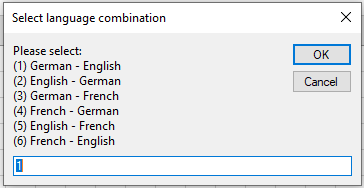
        UserInput = InputBox( _
            "Please select:" & vbCrLf & _
            "(1) German - English" & vbCrLf & _
            "(2) English - German" & vbCrLf & _
            "(3) German - French" & vbCrLf & _
            "(4) French - German" & vbCrLf & _
            "(5) English - French" & vbCrLf & _
            "(6) French - English", _
            "Select language combination", 1)
        If IsNumeric(UserInput) Then
            LanguageCombo = Val(UserInput)
        Else
            LanguageCombo = 0
        End If
    Loop Until LanguageCombo >= 1 And LanguageCombo <= 6
    ' Set source and target languages based on selection
    Select Case LanguageCombo
        Case 1
            Language1 = "German"
            Language2 = "English"
            Col1 = 1
            Col2 = 2
        Case 2
            Language1 = "English"
            Language2 = "German"
            Col1 = 2
            Col2 = 1
        Case 3
            Language1 = "German"
            Language2 = "French"
            Col1 = 1
            Col2 = 3
        Case 4
            Language1 = "French"
            Language2 = "German"
            Col1 = 3
            Col2 = 1
        Case 5
            Language1 = "English"
            Language2 = "French"
            Col1 = 2
            Col2 = 3
        Case 6
            Language1 = "French"
            Language2 = "English"
            Col1 = 3
            Col2 = 2
    End Select
    ' Initialization
    ThisWorkbook.Worksheets("Sheet2").Activate
    TestEnd = False
    Feedback = ""
    ' Load vocabulary into collections
    RowIndex = 2
    Do While Cells(RowIndex, Col1).Value <> ""
        Vocab1.Add Cells(RowIndex, Col1).Value
        Vocab2.Add Cells(RowIndex, Col2).Value
        RowIndex = RowIndex + 1
    Loop
    ThisWorkbook.Worksheets("Sheet1").Activate
    ' Begin test loop
    Do
        ' Get random index within collection size
        RandomIndex = WorksheetFunction.RoundUp(Rnd * Vocab1.Count, 0)
        ' Prepare previous question's feedback
        If Feedback <> "" Then
            PromptText = Feedback & vbCrLf
        Else
            PromptText = ""
        End If
        ' Compose question text
        PromptText = PromptText & _
            "Remaining " & Vocab1.Count & " vocabulary items " & _
            "(Abort with '0')" & vbCrLf & vbCrLf & _
            Language1 & ": " & Vocab1(RandomIndex) & vbCrLf & _
            Language2 & ": "
        UserInput = InputBox(PromptText, "Enter your answer")
        ' Evaluate response
        If UserInput = Vocab2(RandomIndex) Then
            Feedback = "Correct"
            Vocab1.Remove RandomIndex
            Vocab2.Remove RandomIndex
            ' Test complete if no vocabulary left
            If Vocab1.Count < 1 Then
                MsgBox "Test successfully completed"
                TestEnd = True
            End If
        ElseIf UserInput = "0" Then
            MsgBox "Test aborted"
            TestEnd = True
        Else
            Feedback = "Incorrect. The correct answer is: " & Vocab2(RandomIndex)
        End If
    Loop Until TestEnd
End Sub
Explanation of Variables and Workflow (English)
- UserInput: Stores the user’s input string.
- LanguageCombo: Stores the selected language combination number (1 to 6).
- Language1 and Language2: StorQSSDe the names of the source and target languages, respectively.
- Vocab1 and Vocab2: Collections that hold vocabulary words from the chosen source and target languages. When a correct answer is given, the corresponding pair is removed from both collections. The test ends when both are empty.
- RowIndex, Col1, and Col2: Used to read vocabulary from the second worksheet.
- RandomIndex: Stores a randomly generated index to select the current vocabulary pair.
- Feedback: Stores feedback such as « Correct » or « Incorrect… » messages.
- PromptText: Holds the complete prompt text shown in the input box, including any previous feedback.
- TestEnd: Boolean flag to indicate when the test ends (either success or abort).
Workflow:
- The user is repeatedly prompted to select a language combination until they enter a valid number between 1 and 6.
- Based on the selection, source and target language names and their corresponding column numbers in the vocabulary worksheet are set.
- The vocabulary worksheet (« Sheet2 ») is activated, and vocabulary pairs are loaded into two collections by reading rows until an empty cell is found.
- The main worksheet (« Sheet1 ») is reactivated to prevent the user from seeing the vocabulary list.
- The test loop starts:
- A random vocabulary pair is selected.
- Any previous feedback is added to the question prompt.
- The user is asked to translate the displayed word.
- If the answer is correct, the pair is removed.
- If no vocabulary remains, a success message is displayed and the test ends.
- If the user enters « 0 », the test aborts.
- If incorrect, feedback is shown and the question will be asked again later.