
While it’s important to know how to reference objects, simply referring to an object doesn’t accomplish anything useful. To do something meaningful, you need to be able to:
■ read or modify an object’s properties.
■ specify an action method to use with an object.
With thousands of properties and methods available, it’s easy to feel overwhelmed. But you’ll never need to use most of the available properties and methods.
Object Properties
A property is information associated with an object. A property can provide information about the object or define some aspect of the object’s appearance or behavior. Using a car as an example, its properties would include its color, the radio station it’s tuned to, and the amount of fuel in the tank. Some object properties are read-only, meaning you can check their value but not change it (for example, the number of doors). Others are read-write and can be read or modified, such as the radio station.
Properties are essentially characteristics of an object. Similarly, an object in Excel, such as the Worksheet object, has a Name property that can be modified, and a Rows.Count property that cannot be changed.
You refer to an object’s property by referencing the object, followed by the property, separated by a period:
Object.Property
For example, you can rename your worksheet by modifying its Name property. In this example, you rename “Sheet1” to “MySheet”:
Sheets("Sheet1").Name = "MySheet"
Some properties take arguments that further specify the property’s value.
NOTE
To set a property’s value, follow the object reference with a dot, the property name, an equal sign (=), and the new value.
Understanding Methods
A method, on the other hand, is something the object can do—an action it can perform. Continuing with the car analogy, its methods would include “accelerate,” “turn,” and “stop.” Many methods take arguments, which are pieces of information specifying exactly how the method should behave. For example, the “turn” method might have a “direction” argument that can be “right” or “left.”
NOTE
It helps to think of methods as verbs. You can paint your house, so in VBA this translates to something like: house.paint
Methods are actions that can be performed on an object.
The syntax for using methods is:
Object.Method
A simple example of an Excel method is the Select method of the Range object:
Range("A1").Select
This selects cell A1.
Another example is the Copy method of the Range object:
Range("A1:B10").Copy
This copies the contents of the range A1:B10.
You can find all the properties and methods associated with an object. For example, for the Workbooks object (a collection of workbooks), a dropdown menu appears when you type the period.
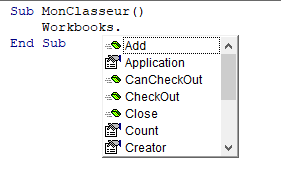
Sometimes, pressing the period (.) may not show the list of properties and methods. In that case, press Ctrl + Space.
In the dropdown menu, properties are identified with one icon, and methods with another.
Some properties and methods take arguments that may define how they are applied. There are three ways to provide arguments:
- Positional arguments with parentheses:
Include the arguments in parentheses, in the correct order, after the method name:
ObjectName.Method(argument1, argument2, ...)
In the rare case of a property that takes arguments, this syntax must also be used. The arguments must be in the precise order.
- Positional arguments without parentheses:
Omit the parentheses but still provide the arguments in the correct order:
ObjectName.Method argument1, argument2, ...
- Named arguments (recommended):
Use the argument name, as defined in the method, followed by:=and the value:
ObjectName.Method ArgumentName1:=ArgumentValue1, ArgumentName2:=ArgumentValue2
For example, the Paste method can be used more efficiently by explicitly defining the Destination argument:
Range("A1").Paste Destination:=Range("D1")
This example copies the content of cell A1 and pastes it into cell D1.
There are two advantages to using named arguments. First, they make your code clearer. The name of each argument describes its purpose, helping you (or others) understand previously written code. Second, they add simplicity. Many methods have numerous optional arguments. You might want to call the method while leaving most arguments at their default values. Without named arguments, the method identifies arguments only by their position in the list, so you’d have to include placeholders (commas) for all the optional arguments you skip. A placeholder is a comma followed by another comma—an omitted argument would go between them. With named arguments, this is unnecessary—you only include the optional arguments you wish to override.