
The contents of the Excel worksheet shown in Next Figure are to be written as a table into the Word document Doc.docx.

Sub WriteWordTable()
    Dim appWord As Word.Application
    Dim document As Word.Document
    Dim table As Word.Table
    Dim i As Integer
    Dim k As Integer
    ThisWorkbook.Worksheets("Sheet2").Activate
    ' Start Word application
    Set appWord = CreateObject("Word.Application")
    ' Create a new Word document
    Set document = appWord.Documents.Add
    ' Add a new table at the beginning of the document with 3 rows and 5 columns
    Set table = document.Tables.Add(appWord.ActiveDocument.Range(0), 3, 5)
    ' Set table borders for inside and outside lines to single line style
    table.Borders.InsideLineStyle = wdLineStyleSingle
    table.Borders.OutsideLineStyle = wdLineStyleSingle
    ' Transfer data from Excel to Word table cells
    For i = 1 To 3
        For k = 1 To 5
            table.Cell(i, k).Range.Text = Cells(i, k).Value
        Next k
    Next i
    ' Save the Word document and close it
    document.SaveAs ThisWorkbook.Path & "C:\Users\POPOLY\Desktop\Doc.docx"
    document.Close
    ' Quit Word application and clean up
    appWord.Quit
    Set table = Nothing
    Set document = Nothing
    Set appWord = Nothing
End Sub
The result of this code is shown in next Figure.
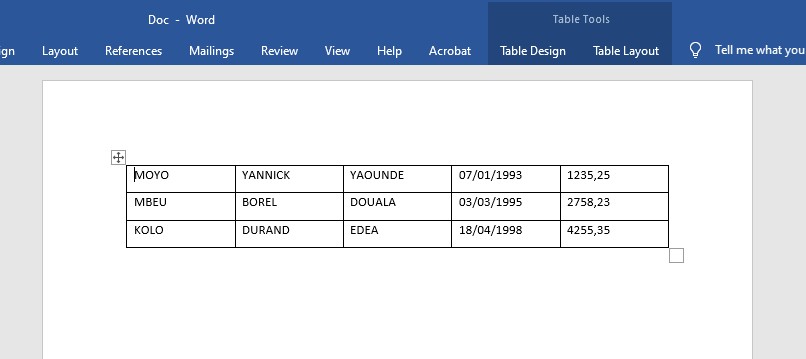
Explanation:
- The Add() method of the Tables collection inserts a new table into the document with the specified size. It requires at least three parameters:
- A Range object that specifies the location of the new table. Using Range(0) places the table at the very beginning of the document.
- The number of rows and columns for the new table.
- The Add() method returns a reference of type Word.Table to the newly created table. This reference is used to interact with the table in subsequent code.
- The Borders property contains all the borders of the table. Properties beginning with Inside… and Outside… control the appearance of inner and outer borders respectively. Here, InsideLineStyle and OutsideLineStyle are set to wdLineStyleSingle, which corresponds to a single-line border. Thus, the table receives a simple grid border.
- Nested loops iterate through all cells of the Excel worksheet and transfer their contents to the corresponding cells in the Word table. In Word, the Cell(row, column) method is used similarly to Excel.