Votre panier est actuellement vide !
Étiquette : macro_operators
Operator Precedence In Excel VBA
When an expression contains multiple operations, the individual subexpressions are evaluated and resolved in a specific order called the operator precedence or priority.
Precedence Operator(s) Description 1 ^ Exponentiation (power operator) 2 Unary – Negative sign (negation) 3 * and / Multiplication and division 4 \ Integer division 5 Mod Modulo operation 6 + and – Addition and subtraction 7 & String concatenation 8 =, <>, <, >, <=, >=, Like Comparison operators (Note: = means comparison, not assignment) 9 Not Logical NOT 10 And Logical AND 11 Or Logical OR 12 Xor Logical exclusive OR Operators of the same precedence level are evaluated left to right.
As mentioned earlier with arithmetic operators, this precedence can be overridden using parentheses, forcing specific expressions to be evaluated before others. Expressions inside parentheses always have priority, but inside them, normal precedence rules apply again.
Concatenation Operator In Excel VBA
The operator & is used to concatenate (join) strings. It is frequently needed to display results clearly combined with descriptive text.
If one of the expressions is not a string but a number or a date, VBA automatically converts it to a string before concatenation. The overall result is always a string.
Example:
Sub ConcatenationOperator()
    Dim a As String
    Dim s As Single
    Dim d As Date
    d = "15/03/2020"
    s = 4.6
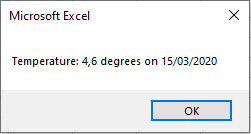
    a = "Temperature: " & s & " degrees on " & d
    MsgBox a
End Sub
Logical Operators In Excel VBA
Logical operators are used to combine multiple conditions. Lists the most important logical operators:
Operator Description Result is True when… Not Not … the expression is False And And … both expressions are True Or Inclusive Or … at least one expression is True Xor Exclusive Or … exactly one expression is True Given the variables a = 1, b = 3, and c = 5, observe the results in Table 3.10:
Expression Result Not (a < b) False (b > a) And (c > b) True (b < a) Or (c < b) False (b < a) Xor (c > b) True Shows the truth tables of these logical operators, where Expression 1 and Expression 2 can each be True or False:
Expr1 Expr2 Not Expr1 Expr1 And Expr2 Expr1 Or Expr2 Expr1 Xor Expr2 True True False True True False True False False False True True False True True False True True False False True False False False Note: The Not operator only applies to Expression 1.
Example Procedure Using Logical Operators:
Sub LogicalOperators()
    Dim a As Integer, b As Integer, c As Integer
    a = 1
    b = 3
    c = 5
    ThisWorkbook.Worksheets("Sheet1").Activate
    Range("G1").Value = Not (a < b)
    Range("G2").Value = (b > a) And (c > b)
    Range("G3").Value = (b < a) Or (c < b)
    Range("G4").Value = (b < a) Xor (c > b)
End Sub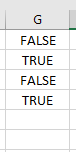
Comparison Operators In Excel VBA
Comparison operators are used in conditions, which are essential for controlling program flow with branching (e.g., If statements) and loops. Branching works on the same principle as Excel’s IF() function.
The result of a comparison is one of the two Boolean values: True or False. lists the common comparison operators:
Operator Description < Less than <= Less than or equal to > Greater than >= Greater than or equal to = Equal to <> Not equal to Examples:
Expression Result 5 > 3 True 3 = 3.2 False 5 + 3 * 2 >= 12 False The Like Operator
In addition, VBA supports the Like operator for pattern matching. You can use wildcards such as:
- * (asterisk) for zero or more characters
- ? (question mark) for exactly one character
Expression Result « abxba » Like « a*a » True « abxba » Like « a?a » False « aba » Like « a?a » True « asdlfigc » Like « a?d?f*c » True The Like operator allows you to perform much more complex pattern matching than shown here.
Example Procedure Using Comparison Operators:
Sub ComparisonOperators()
    ThisWorkbook.Worksheets("Sheet1").Activate
    Range("E1").Value = (5 > 3)
    Range("E2").Value = (3 = 3.2)
    Range("E3").Value = (5 + 3 * 2 >= 12)
    Range("F1").Value = ("abxba" Like "a*a")
    Range("F2").Value = ("abxba" Like "a?a")
    Range("F3").Value = ("aba" Like "a?a")
    Range("F4").Value = ("asdlfigc" Like "a?d?f*c")
End Sub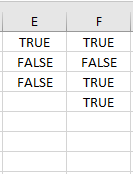
Note: Parentheses around comparison expressions are not necessary for correct evaluation; they are included here only to improve readability.
Arithmetic Operators In Excel VBA
Arithmetic operators are used to perform calculations. Table 3.2 lists the arithmetic operators available in VBA:
Operator Description + Addition – Subtraction or Negation * Multiplication / Division \ Integer Division (see explanation below) Mod Modulo (remainder) operation (see explanation below) ^ Exponentiation (power) Division
The division operator / returns the expected decimal result. However, the data type of the variable that stores the result is important:
- In the first example, the result is stored in a Double variable and will display the exact division result.
- In the second example, the result is stored in an Integer variable, which causes rounding.
Example 1: Division without rounding
Sub DivisionWithoutRounding()
    Dim x As Double
    x = 13 / 5
    MsgBox x  ' Displays 2.6
End Sub
Example 2: Division with rounding
Sub DivisionWithRounding()
    Dim x As Integer
    x = 13 / 5
    MsgBox x  ' Displays 3 due to rounding
End Sub
Integer Division (\ Operator)
Integer division is performed in two steps:
- Both the dividend and divisor are individually rounded.
- The rounded numbers are divided.
- The fractional part (digits after the decimal point) is discarded (truncated).
Excel has no direct equivalent for this operator.
Examples:
Expression Result 19 / 4 4.75 19 \ 4 4 19 \ 4.6 3 19.5 \ 4.2 5 Modulo Operator (Mod)
The Mod operator returns the remainder of a division. The calculation is done in two steps:
- Dividend and divisor are individually rounded.
- The remainder of the integer division is returned.
Excel provides the REST() function, which calculates the remainder without rounding. For example, REST(19.5; 3.2) returns 0.3 instead of 2.
Examples:
Expression Result 19 Mod 4 3 19.5 Mod 3.2 2 Exponentiation (^ Operator)
Exponentiation uses the ^ operator in both Excel and VBA. The function POTENZ() also exists and produces the same results.
Examples:
Expression Result 2 ^ 5 32 3 ^ 2 ^ 3 729 2 ^ 5.4 42.2242531447326 -2 ^ 5 -32 Example Procedure Using Arithmetic Operators
The following VBA procedure demonstrates the use of several arithmetic operators:
Sub ArithmeticOperators()
    ThisWorkbook.Worksheets("Sheet1").Activate
    ' Basic arithmetic
    Range("C1").Value = 5 * 3 - 6 / 3
    Range("C2").Value = 5 * (3 - 6) / 3
    ' Integer division
    Range("C4").Value = 19 / 4
    Range("C5").Value = 19 \ 4
    Range("C6").Value = 19 \ 4.6
    Range("C7").Value = 19.5 \ 4.2
    ' Modulo operator
    Range("D1").Value = 19 Mod 4
    Range("D2").Value = 19.5 Mod 3.2
    ' Exponentiation
    Range("D4").Value = 2 ^ 5
    Range("D5").Value = 3 ^ 2 ^ 3
    Range("D6").Value = 2 ^ 5.4
    Range("D7").Value = -2 ^ 5
End Sub
Operator Precedence and Associativity
- Multiplication and division have the same precedence and are evaluated from left to right as they appear in an expression.
- The same applies to addition and subtraction.
- Parentheses can override this precedence, forcing specific subexpressions to be evaluated first.
- Operations inside parentheses follow the normal precedence rules again.