Votre panier est actuellement vide !
Étiquette : statistical
How to use the COUNT function in Excel
The COUNT function is a function that counts the number of cells containing numbers, as well as the number of arguments that include numerical values.
The COUNT function uses the following syntax:
- Value1 (Required Argument): The cell range or value you want to include in the count (must contain numbers).
- Value2, … (Optional Argument): You can add up to 255 additional items, cell references, or ranges where numbers should be counted.
USING THE COUNT FUNCTION
Using the table below, we will count how many cells contain numbers with the COUNT function.
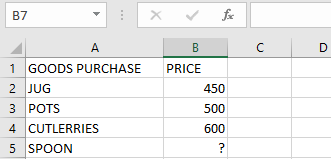
To count cells with numbers, follow these steps:
- Select an empty cell.
- Type the function followed by the range:
=COUNT(A2:B5)

Press Enter. The result will be 3.
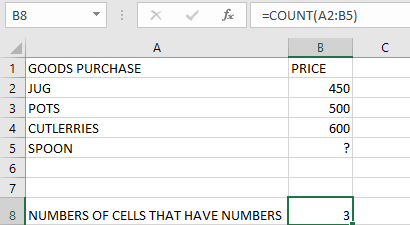
NOTE: IMPORTANT POINTS ABOUT THE COUNT FUNCTION
- Counted Values: Numbers, dates, and text representations of numbers (e.g., « 10 »).
- Not Counted: Text values, errors, or empty cells.
- For counting logical values (TRUE/FALSE), use COUNTA.
- For counting numbers based on conditions, use COUNTIF or COUNTIFS.
- The COUNT function does not count logical values (TRUE or FALSE).
- If an argument is an array or reference, only numbers within it are counted.