Votre panier est actuellement vide !
Étiquette : engineering-function
How to use the BESSELJ() function in Excel
This function returns the Bessel function of the first kind, Jₙ(x).
Syntax
BESSELJ(x ; n)Arguments
- x (required)
The value at which to evaluate the function:- Must be a real number
- Valid range: approximately -1.34×10⁸ to +1.34×10⁸ (range varies with order n)
- n (required)
The order of the Bessel function:- Must be positive
- Non-integer values are truncated (decimal places ignored)
Background
The Bessel function Jₙ(x) is a solution to Bessel’s differential equation:x²y » + xy’ + (x² – n²)y = 0
or
y » + (1/x)y’ + (1 – n²/x²)y = 0
For real ν, the function can be calculated using:

where Γ(y) is the gamma function.
Example
Due to the specialized nature of Bessel functions, this example focuses on their graphical representation (see Figures below).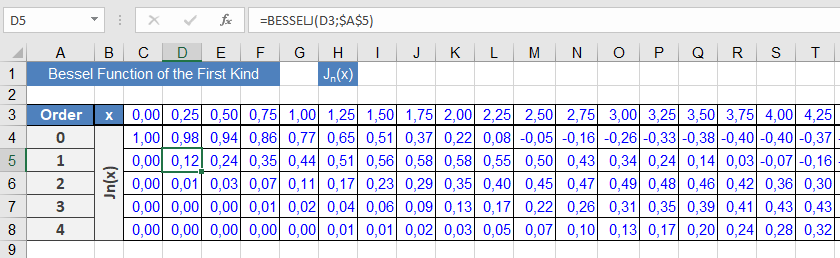
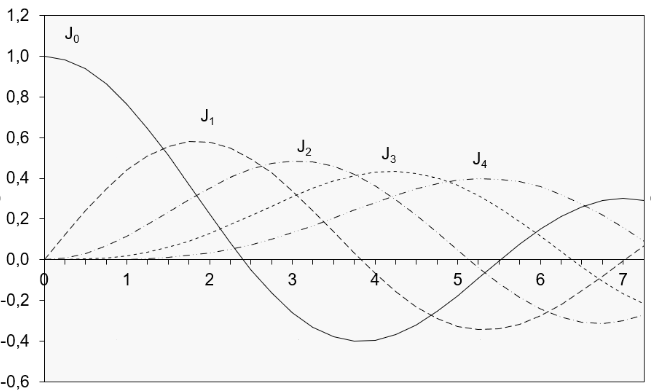
Implementation notes:
- The sample worksheet calculates Jₙ(x) for orders 0 through 4
- Results are displayed in the graph shown in Figure above
- The oscillatory behavior characteristic of Jₙ(x) is clearly visible
Key Properties
- Oscillates with decreasing amplitude as x increases
- Jₙ(-x) = (-1)ⁿJₙ(x)
- For integer n, Jₙ and J₋ₙ are linearly dependent
- Satisfies various recurrence relations
Technical Applications
- Cylindrical wave propagation
- Heat conduction in circular geometries
- Solutions to Laplace’s equation in polar coordinates
- Modeling of drumhead vibrations
Computation Notes
- Calculated via power series expansion
- Accuracy depends on argument range and order
- Higher orders require more terms for convergence
- x (required)
How to use the BESSELI() function in Excel
This function returns the modified Bessel function of the first kind, Iₙ(x), which corresponds to the Bessel function Jₙ evaluated for purely imaginary arguments.
Syntax
BESSELI(x ; n)Arguments
- x (required)
The value at which to evaluate the function:- Must be a real number
- Valid range: approximately ±700 (varies with order n)
- n (required)
The order of the Bessel function:- Must be a positive integer
- Non-integer values are truncated (not rounded)
Background
Iₙ(x), like Kₙ(x), belongs to the modified Bessel functions that exhibit exponential growth or decay, unlike the oscillatory behavior of standard Bessel functions Jₙ(x) and Yₙ(x). Iₙ(x) is the solution to the modified Bessel’s differential equation:x²y » + xy’ – (x² + n²)y = 0
or
y » + (1/x)y’ – (1 + n²/x²)y = 0
The modified Bessel function of the first kind can be represented as a loop integral of order n. For real ν, it can be calculated using:
I_ν(x) = (1/π) ∫[0 to π] e^{x cosθ}cos(νθ) dθ
where Γ(y) is the gamma function.
Example
Working with Bessel functions requires specialized domain knowledge. This example focuses on mathematical properties and their graphical representation (see Figure below).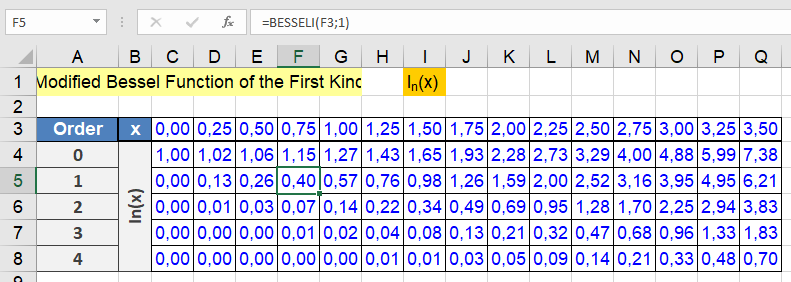
Implementation notes:
- Cell A3 contains the reference label « Order »
- Cells C4:Q8 contain BESSELI() formulas
- Row 3 contains x-values (first argument)
- Column A contains order values (second argument)
- Example formula in C4:
=BESSELI(C$3,$A4)
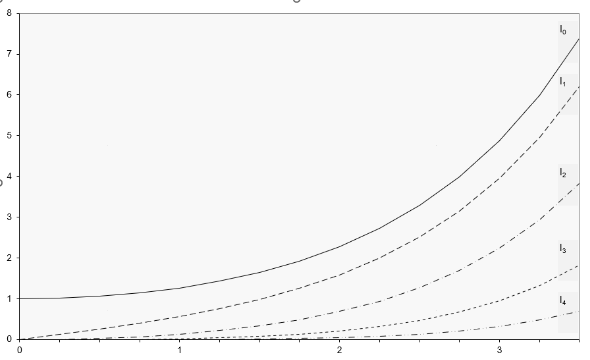
The data range C3:Q8 generates the graph in Figure below, showing the characteristic exponential growth of Iₙ(x), which produces large values even at small x.
Key Properties
- Exhibits monotonic exponential growth
- Iₙ(0) = 0 for n > 0
- Iₙ(-x) = (-1)ⁿIₙ(x)
- Recurrence relations connect functions of different orders
Technical Applications
- Electromagnetic wave propagation
- Heat conduction in cylindrical systems
- Quantum mechanical potential problems
- Fluid dynamics in porous media
- x (required)
How to use the BIN2HEX() function in Excel
This function converts a binary number into a hexadecimal number.
Syntax
BIN2HEX(number; [places])Arguments
- number(required) – The binary number to be converted:
- Maximum of 10 digits
- Uses two’s complement notation (see « Two’s Complement » section)
- Negative values return a 10-digit hexadecimal number
- places(optional) – Specifies the number of digits to display:
- Adds leading zeros if needed
- If omitted, displays only necessary digits
- Decimal places are ignored
Background
For comprehensive information about number systems and conversion methods, refer to the « Number Systems » section in the function introduction.Examples
The following examples demonstrate the BIN2HEX() function:- =BIN2HEX(000000001)returns 1
- =BIN2HEX(1110,4)returns 000E
- =BIN2HEX(000001010)returns 0A

Additional Resources
More examples can be found in the BIN2DEC() function documentation.Key Features
- Handles both positive and negative binary numbers
- Optional places parameter for formatting
- Automatic sign detection through two’s complement
- 10-digit binary input limit
- Returns full 10-digit hex for negative numbers regardless of places parameter
- number(required) – The binary number to be converted:
How to use the BIN2DEC() function in Excel
This function converts a binary number into a decimal number.
Syntax
BIN2DEC(number)Argument
- number(required) – The binary number to be converted, which must:
- Be in two’s complement notation
- Contain no more than 10 digits
Background
For detailed information about number systems and two’s complement notation, refer to the « Number Systems » section in the introduction to these functions.Examples
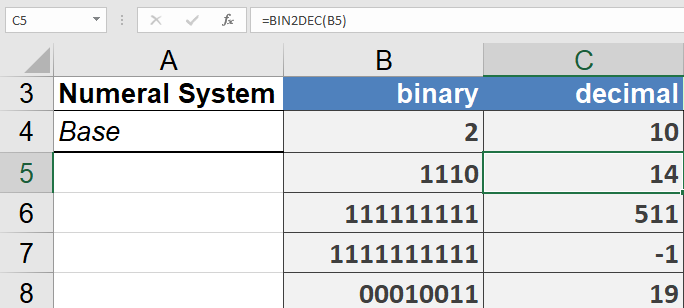
The following examples demonstrate the BIN2DEC() function:- =BIN2DEC(1110)returns 14
- =BIN2DEC(111111111)returns 511
- =BIN2DEC(1111111111)returns -1 (demonstrating two’s complement representation)
- =BIN2DEC(1111111110)returns -2
Key Notes
- The function handles both positive and negative numbers through two’s complement representation
- The 10-digit limit is important as it determines the range of numbers that can be represented
- For positive numbers, the conversion is straightforward binary-to-decimal
- For negative numbers (indicated by a leading 1 in two’s complement), the function properly interprets the two’s complement notation
- number(required) – The binary number to be converted, which must: