Votre panier est actuellement vide !
Étiquette : function
How to use the CUMPRINC() function in Excel
This function calculates the principal portion repaid between two specified periods for an annuity loan (a loan repaid in equal periodic installments).
Syntax:
CUMPRINC(Rate, Nper; Pv; Start_Period; End_Period; Type)
Arguments:
- Rate (required): The nominal interest rate of the loan.
- Nper (required): The total number of repayment periods.
- Pv (required): The principal loan amount.
- Start_Period (required): The first period of the calculation.
- End_Period (required): The last period of the calculation.
- Type (required): The payment timing argument, where:
- Type = 1 indicates payments are made at the beginning of each period.
- Type = 0 (default) indicates payments are made at the end of each period.
Notes:
- If fractional values are provided for integer-based arguments (e.g., Start_Period), the decimals are truncated.
- Rate, Nper, and Pv must be positive; otherwise, CUMPRINC() returns the #NUM! error.
- Start_Period must be ≥ 1.
- End_Period must be ≥ 1 and ≥ Start_Period.
- Type must be 0 or 1.
Background:
Loans can be repaid in different ways. In an annuity repayment:
- The borrower pays a fixed amount each period, consisting of:
- A principal repayment portion (increases over time).
- An interest portion (decreases as the outstanding loan balance shrinks).
This function calculates the compounded principal repayment (excluding interest). By summing principal repayments over past periods, you can determine the residual debt (remaining loan balance).
Examples:
- Principal Repayment Over a Loan Term
In the Repayment Calculation (Annuity) example from the PV() function:- A borrower takes a $176,121.76 loan at 5.5% annual interest, repaying $1,000/month for 30 years.
- By the 19th month, the residual debt is $172,513.25, meaning $3,608.51 of principal has been repaid.
Verify this with CUMPRINC() (accounting for rounding errors):
=-CUMPRINC(5.5%/12; 30*12; 176121.76; 1; 18; 0)
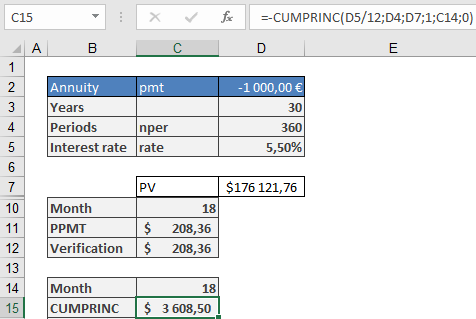
(Negative result indicates cash outflow relative to the loan amount.)
- Fixed-Rate Mortgages & Residual Debt
Many mortgage loans have a fixed interest rate for an initial period (shorter than the full term).- Borrowers can use CUMPRINC() to calculate residual debt after the fixed-rate period.
- This helps assess refinancing risks if interest rates rise.
- Example calculation method matches the previous example.
Rounding Considerations:
Built-in functions may not reflect real-world bank calculations (which use 2 decimal places). For precise repayment schedules, use the ROUND() function in monthly plans.
How to use the CUMIPMT() function in Excel
This function calculates the accrued interest paid between two specified periods for an annuity loan (a loan repaid in equal periodic installments).
Syntax:
CUMIPMT(Rate, Nper; Pv; Start_Period; End_Period; Type)Arguments:
- Rate (required): The nominal interest rate of the loan.
- Nper (required): The total number of repayment periods.
- Pv (required): The principal loan amount.
- Start_Period (required): The first period of the calculation.
- End_Period (required): The last period of the calculation.
- Type (required): The payment timing argument, where:
- Type = 1 indicates payments are made at the beginning of each period.
- Type = 0 (default) indicates payments are made at the end of each period.
Notes:
- If fractional values are provided for integer-based arguments (e.g., Start_Period), the decimals are truncated.
- Rate, Nper, and Pv must be positive; otherwise, CUMIPMT() returns the #NUM! error.
- Start_Period must be ≥ 1.
- End_Period must be ≥ 1 and ≥ Start_Period.
- Type must be 0 or 1.
Background:
Loans can be repaid in different ways. In an annuity repayment, the borrower pays a fixed amount each period, consisting of:- A repayment portion (increases over time).
- An interest portion (decreases as the outstanding loan balance shrinks).
While summing partial repayments is valid (to determine residual debt), summing interest payments lacks financial-mathematical significance. It is commonly used for loan comparisons (even by financial institutions), but it does not reflect a true financial analysis. Interest totals are meaningful only when evaluated at the loan’s origination. For example, a $100,000 loan requires repayment of the principal plus accrued interest if repaid later.
Example:
In the Repayment Calculation (Annuity) example from the PV() function:- A borrower takes a $176,121.76 loan at 5.5% annual interest, repaying $1,000/month for 30 years.
- By the 19th month, the residual debt is $172,513.25, indicating $3,608.51 has been repaid. Thus, the interest paid is:
$18,000 (total paid) – $3,608.51 (principal) = $14,391.49 (interest).
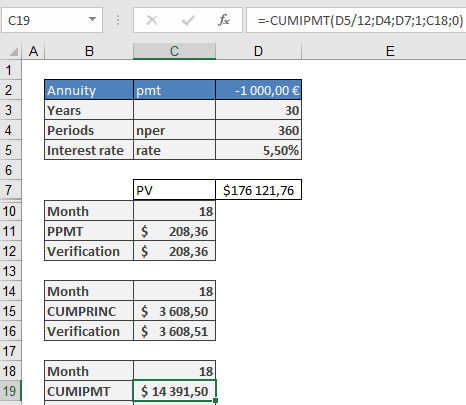
This can be verified with CUMIPMT() (accounting for rounding errors):
=-CUMIPMT(5.5%/12, 30*12, 176121.76, 1, 18, 0)
(Negative result indicates cash outflow relative to the loan amount.)
Rounding Considerations:
Built-in functions may not reflect real-world bank calculations (which use 2 decimal places). For precise repayment schedules, use the ROUND() function in monthly plans.How to use the COUPNUM() function in Excel
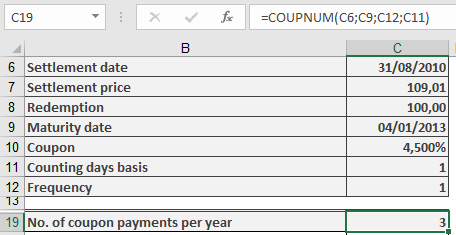
This function calculates the number of coupon payments (interest payment dates) remaining after the settlement date—i.e., how many interest payments the new owner of a fixed-interest security will receive until maturity.
Syntax. COUPNUM(Settlement; Maturity; Frequency; Basis)
Arguments- Settlement (required): The date on which the bond is purchased or transferred (ownership changes).
- Maturity (required): The date on which the bond will be repaid (the loan ends).
- Frequency (required): Specifies the number of coupon payments per year. Valid values:
- 1 = Annual payments
- 2 = Semiannual (every six months)
- 4 = Quarterly (every three months)
- Basis (optional): Defines the day count basis used for calculations. If omitted, Excel uses Basis = 0.
Refer to Table 15-2 for available basis options:- 0 = US (NASD) 30/360
- 1 = Actual/actual
- 2 = Actual/360
- 3 = Actual/365
- 4 = European 30/360
Argument Requirements & Errors
- Date values must not include time components; any decimal portion is truncated.
- The Frequency and Basis values are also truncated to integers.
- If Settlement or Maturity is not a valid date, the function returns a #VALUE! error.
- If Frequency is not 1, 2, or 4, or if Basis is not in the range 0–4, the function returns a #NUM! error.
- If the Settlement date is later than the Maturity date, the function also returns a #NUM! error.
Background
For fixed-interest securities (bonds), coupon payments are made regularly according to the maturity date and payment frequency.
The COUPNUM() function determines how many of these payments are left after the bond is purchased.This result is useful when calculating the present value of future payments, such as when determining the bond’s PRICE() or YIELD() at purchase.
Note that the day count basis (Basis argument) can affect results, especially for partial-year (intra-annual) periods.Example
How to use the COUPNCD() Function in Excel
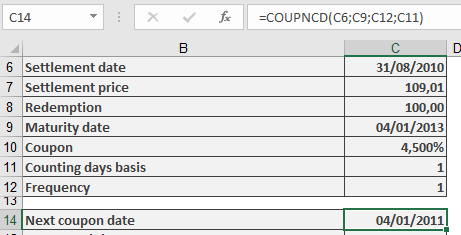
Returns the next coupon payment date after the settlement date for a fixed-income security with regular interest payments.
Syntax
COUPNCD(Settlement; Maturity; Frequency; Basis)
Arguments
Argument Required Description Valid Values Settlement Yes Date of ownership transfer Valid Excel date Maturity Yes Bond repayment date Must be after Settlement Frequency Yes Interest payments per year 1 (annual), 2 (semi-annual), 4 (quarterly) Basis No Day-count convention 0-4 (default=0) Day-Count Basis Methods (Table 1)
Basis Method Common Usage 0 30/360 (NASD) Corporate bonds 1 Actual/Actual Government securities 2 Actual/360 Money market instruments 3 Actual/365 UK gilts 4 30/360 (European) Eurobonds Requirements & Error Handling
- Dates must be valid (time components are ignored)
- Frequency and Basis are converted to integers
- Returns #VALUE! for invalid date formats
- Returns #NUM! for:
- Invalid Frequency (not 1, 2, or 4)
- Invalid Basis (not 0-4)
- Settlement date ≥ Maturity date
Background
- Critical for determining future cash flows
- Used in conjunction with:
- COUPDAYSNC() (days to next coupon)
- COUPPCD() (previous coupon date)
- Different day-count methods may yield different coupon date calculations
Example Applications
Key Notes
- For US corporate bonds: Typically Basis=0
- For Treasury securities: Typically Basis=1
- Always verify Settlement precedes Maturity
- Combine with COUPNUM() for complete coupon analysis
- Critical for bond portfolio management between payment dates
Common Errors
- Using text strings instead of date serials
- Incorrect Frequency for bond type
- Mismatching Basis with market convention
Note: Refer to RATE() and YIELD() function examples for implementation scenarios.
How to use the COUPDAYSNC() Function in Excel
Calculates the number of days from the settlement date to the next coupon payment date for a fixed-income security.
Syntax
COUPDAYSNC(Settlement; Maturity; Frequency; Basis)
Arguments
Argument Required Description Valid Values Settlement Yes Date ownership transfers Valid date (time truncated) Maturity Yes Bond repayment date Must be after Settlement Frequency Yes Coupon payments per year 1, 2, or 4 Basis No Day-count method 0-4 (default=0) Day-Count Basis Methods
Basis Method Key Characteristic 0 30/360 (NASD) Standard financial convention 1 Actual/Actual Exact day count 2 Actual/360 Money market convention 3 Actual/365 British convention 4 30/360 (European) Eurobond convention Key Features
- Primary Use:
- Determines days until next coupon payment
- Essential for calculating:
- Accrued interest allocations
- Present value of future cash flows
- Error Handling:
- #VALUE!: Invalid date format
- #NUM!:
- Invalid Frequency/Basis
- Settlement ≥ Maturity
- Calculation Method:
- Automatically identifies next coupon date
- Applies specified day-count convention
EXAMPLE
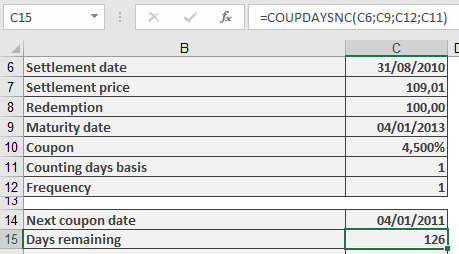
Common Implementation Errors
- Using maturity date as settlement
- Incorrect Basis for security type
- Forgetting to truncate time values
- Primary Use:
How to use the COUPDAYS() Function in Excel
Calculates the total number of days in the coupon period that contains the settlement date for a fixed-income security.
Syntax
COUPDAYS(Settlement; Maturity; Frequency; Basis)
Arguments
Argument Required Description Valid Values Settlement Yes Date of ownership transfer Valid Excel date Maturity Yes Bond repayment date Must be after Settlement Frequency Yes Interest payments per year 1 (annual), 2 (semi-annual), 4 (quarterly) Basis No Day-count convention 0-4 (default=0) Day-Count Basis Methods (Table 1)
Basis Method Description 0 30/360 (NASD) 30-day months, 360-day year 1 Actual/Actual Exact calendar days 2 Actual/360 Actual days/360-day year 3 Actual/365 Actual days/365-day year 4 30/360 (European) European 30-day convention Requirements & Error Handling
- Dates must be valid (time components are ignored)
- Frequency and Basis are converted to integers
- Returns #VALUE! for:
- Invalid date formats
- Text instead of dates
- Returns #NUM! for:
- Invalid Frequency (not 1, 2, or 4)
- Invalid Basis (not 0-4)
- Settlement date later than Maturity date
Background
- Determines the length of the current coupon period
- Essential for calculating:
- Accrued interest
- Day-count fractions for yield calculations
- Different day-count methods produce slightly different results
- Used in conjunction with other coupon functions (COUPDAYBS, COUPDAYSNC)
Example Applications
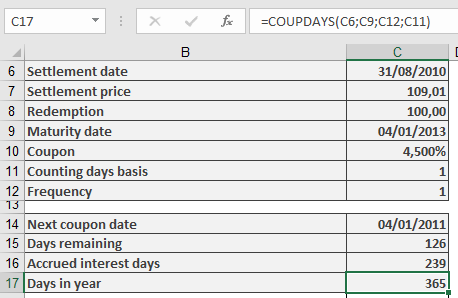
Key Notes
- For US corporate bonds: Typically Basis=0 (30/360)
- For government bonds: Typically Basis=1 (Actual/Actual)
- Always verify Settlement date precedes Maturity date
- Combine with COUPNUM() and COUPPCD() for complete coupon analysis
- Critical for accurate dirty price calculations in bond trading
How to use the COUPDAYBS() Function in Excel
Calculates the number of days between the last coupon payment date and the settlement date for a fixed-income security with regular interest payments.
Syntax
COUPDAYBS(Settlement; Maturity; Frequency; Basis)
Arguments
Argument Required Description Valid Values Settlement Yes Date of ownership transfer Valid date format Maturity Yes Bond repayment date Must be after Settlement Frequency Yes Interest payments per year 1 (annual), 2 (semi-annual), 4 (quarterly) Basis No Day-count convention (see Table 1) 0-4 (default=0) Day-Count Basis Methods (Table 1)
Basis Method Description 0 30/360 (NASD) 30-day months, 360-day year 1 Actual/Actual Exact calendar days 2 Actual/360 Actual days/360-day year 3 Actual/365 Actual days/365-day year 4 30/360 (European) European 30-day convention Requirements & Error Handling
- Dates must be valid (no time component)
- Frequency and Basis are truncated to integers
- Returns #VALUE! for invalid dates
- Returns #NUM! for:
- Invalid Frequency (≠1,2,4)
- Invalid Basis (≠0-4)
- Settlement date > Maturity date
Background
- Used to calculate accrued interest owed when bonds trade between coupon dates
- Different day-count methods yield slightly different results
- Essential for accurate bond pricing and yield calculations
Example Applications
- Accrued Interest Calculation:
Accrued Interest = (Annual Coupon Rate × Face Value) × (COUPDAYBS()/Days in Coupon Period)
- Yield Analysis:
- Used with YIELD() and PRICE() functions
- Helps determine exact holding period returns
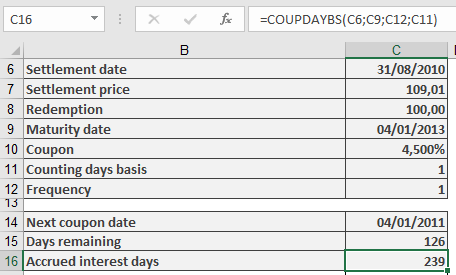
Key Notes
- For US corporate bonds: Typically Basis=0 (30/360)
- For government bonds: Typically Basis=1 (Actual/Actual)
- Always verify Settlement < Maturity
- Combine with COUPNCD() and COUPPCD() for complete coupon date analysis
How to use the AMORLINC() function in Excel
This function calculates the linear depreciation of an asset for a specified period, following the French accounting system. Unlike AMORDEGRC() (which uses degressive depreciation), AMORLINC() applies a straight-line method, making it adaptable to other tax jurisdictions with minor adjustments.
Syntax
AMORLINC(Cost; Date; First_Period; Residual_Value; Period; Rate; Basis)
Arguments
Table 1
Argument Description Cost (required) Total purchase cost (including expenses, minus discounts). Must be positive; otherwise, returns #VALUE! or #NUMBER!. Date (required) Asset purchase date (depreciation start date). First_Period (required) End date of the first depreciation period (assigned period 0). Residual_Value (required) Expected remaining value post-depreciation. Must be ≤ Cost and non-negative; otherwise, returns #NUMBER!. Period (required) Depreciation period (integer ≥ 0). Rate (required) Annual depreciation rate (e.g., 10% for 10 years, 20% for 5 years). Basis (optional) Day-count method (see Table 2 below). Default varies by region. Table 2: Day-Count Methods
Basis Method Description 0 30/360 (NASD) 30-day months, 360-day year. Adjusts 31st to 30th. 1 Exact/Exact Actual days per month/year. 2 Exact/360 Actual days/month; year = 360 days. 3 Exact/365 Actual days/month; year = 365 days. 4 30/360 (European) 30-day months; converts 31st to 30th. Key Notes
- First Period (Period 0):
- Depreciation is prorated based on days counted (per Basis).
- Example: Purchase in October → First period covers October–December.
- Residual Value Handling:
- If residual = 0: Depreciation may extend beyond the planned periods to account for partial-year start.
- If residual > 0: Depreciation stops when book value ≤ residual.
- Tax Law Adaptations:
- For German tax law, use Basis = 4 and set:
- Date = First day of the purchase month.
- First_Period = January 1 of the next year.
- Avoid using month-end dates (e.g., February 28) to prevent day-count errors.
- For German tax law, use Basis = 4 and set:
Example
Scenario: Purchase a $3,000 computer on October 5, 2010, with:
- Depreciation rate: 33.333% (3-year lifespan).
- Residual value: $0.
- First period ends: January 1, 2011.
Formula
=AMORLINC(3000, DATE(2010,10,1); « 1/1/2011 »; 0; 0; 33.333%; 4)
Result: $250.00 (depreciation for October–December 2010).
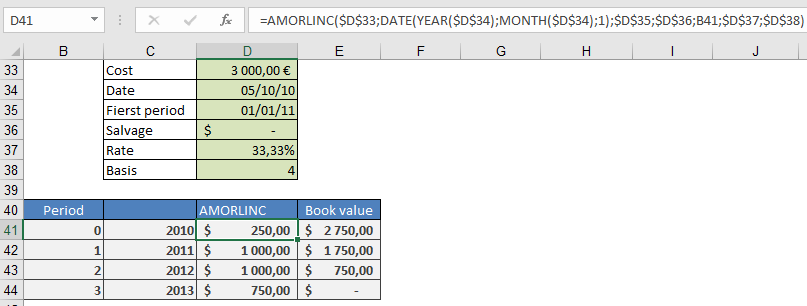
Manual Calculation
- Days in first period:
=DAYS360(DATE(2010,10,1); « 1/1/2011 »; TRUE) → 90 days
- Depreciation:
=3000 × 33.333% × (90/360) → $250.00
Alternative:
=3000 × 33.333% × (3 months / 12) → $250.00
Why Use AMORLINC?
- Simplicity: Straight-line method avoids complex degressive calculations.
- Flexibility: Adaptable to various tax laws with proper Basis selection.
- Accuracy: Handles partial-year depreciation seamlessly.
- First Period (Period 0):
How to use the AMORDEGRC() function in Excel
This function calculates the depreciation amount for an asset in a given period using the French accounting system (degressive depreciation with a switch to linear). The result is rounded to an integer.
Syntax
AMORDEGRC(Cost; Date; First_Period; Residual_Value; Period; Rate; Basis)
Arguments
- Cost (required) – Purchase cost of the asset (including incidental expenses, minus discounts).
- Must be a positive number; otherwise, #VALUE! or #NUMBER! errors occur.
- Date (required) – The purchase date (start of depreciation).
- First_Period (required) – The end date of the first depreciation period (assigned period number 0).
- Residual_Value (required) – Expected remaining value after depreciation.
- Must be less than Cost and non-negative; otherwise, #NUMBER! is returned.
- Period (required) – The time period for which depreciation is calculated (integer ≥ 0).
- Rate (required) – The depreciation rate (initially linear, then degressive).
- Basis (optional) – Day-count method (see Table 1 below).
Table 1: Day-Count Methods
Basis Method Description 0 30/360 (NASD) Months = 30 days; years = 360 days. Adjusts 31st to 30th. 1 Exact/Exact Actual days per month/year. 2 Exact/360 Actual days/month; year = 360 days. 3 Exact/365 Actual days/month; year = 365 days. 4 30/360 (European) Months = 30 days; years = 360 days. Converts 31st to 30th. Background
- Depreciation reflects the asset’s value loss (not physical wear).
- The Rate is first treated as linear (e.g., 10% = 10-year lifespan).
- Degressive weighting is applied based on the rate:
- Factor 1.5 if Rate > 25% (3–4 years).
- Factor 2 if 16.66% ≤ Rate ≤ 25% (5–6 years).
- Factor 2.5 if Rate < 16.67% (>6 years).
- Residual value handling:
- If residual = 0, the last two periods split the remaining value.
- If residual > 0, depreciation stops when book value ≤ residual.
Example
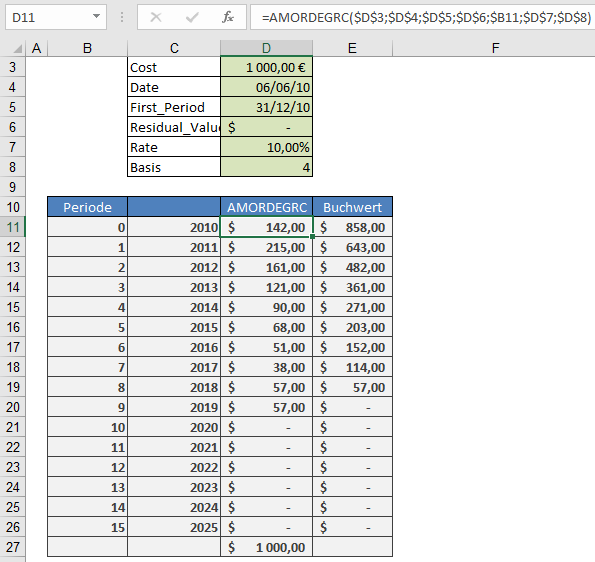
An asset is purchased on June 6, 2010, for $1,000, with:
- Depreciation rate: 10%
- Residual value: $142
- First period ends: December 31, 2010
Formula
=AMORDEGRC(1000; « 6/6/2010 »; « 12/31/2010 »; 142; 0; 10%; 4)
Manual Calculation
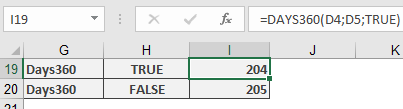
- Days in first period:
=DAYS360(« 6/6/2010 »; « 12/31/2010 »; TRUE) → 204 days
- Depreciation:
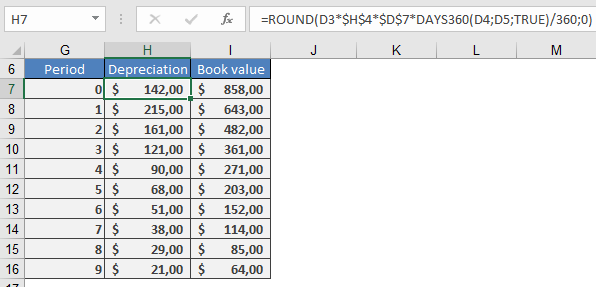
=ROUND(1000 × 10% × 2.5 × (204/360); 0) → $142 (matches AMORDEGRC).
Subsequent Periods
- Multiply the previous book value by 10% × 2.5.
- Cost (required) – Purchase cost of the asset (including incidental expenses, minus discounts).
How to use the ACCRINTM() function in Excel
The ACCRINTM() function calculates the accrued interest of a debt instrument (such as a bond or loan) that has a single interest payment at maturity. This is a simplified version of ACCRINT(), designed for securities with one annual interest period.
Syntax
ACCRINTM(Issue; Settlement; Nominal_Interest; Par_Value; Basis)
Arguments
- Issue (required) – The issuance date of the security.
- Settlement (required) – The date when ownership of the security changes.
- Nominal_Interest (required) – The annual interest rate of the security.
- Par_Value (optional) – The nominal value of the security. If omitted, Excel defaults to 1000 (contrary to older Excel Help documentation).
- Basis (optional) – Day-count convention.
Notes
- Dates must be entered without time values (decimals are truncated).
- Basis must be an integer (decimals are truncated).
- Errors:
- #VALUE! – Invalid dates or non-numeric entries.
- #NUMBER! – Invalid numeric inputs.
Background
- This function is specifically for single-payment securities (e.g., zero-coupon bonds or loans due in full at maturity).
- Unlike ACCRINT(), which handles periodic interest payments, ACCRINTM() assumes one annual interest period.
- The calculation method aligns with ACCRINT(), but with a simplified structure.
Examples
- Debt Due in Full
A $1,000 debt issued on June 1, 2010, with:
- 4% annual interest
- Ownership change on August 9, 2010
Formula:
=ACCRINTM(C2, C3, 4%, 1000, 4)- C2 = Issue date (June 1, 2010)
- C3 = Settlement date (August 9, 2010)
Result:

Calculates the accrued interest from issuance to settlement.- German Federal Government Bond (WKN 113517)
- Issued: October 25, 2000
- Nominal Interest: 5.5% (annual)
- Maturity: January 4, 2031
- Purchase Date: August 30, 2010
- Market Price: €143.27
Formula:
=ACCRINTM(C24, C25, 5.5%, 100, 4)- C24 = Last interest payment date (January 4, 2010)
- C25 = Settlement date (August 30, 2010)
Result:
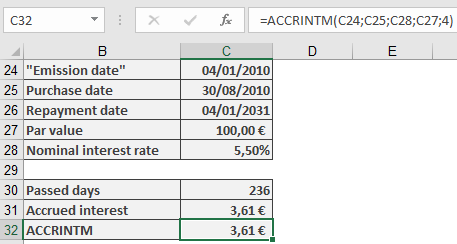
- Accrued Interest: €3.61 per bond
- Total Payment: €143.27 (price) + €3.61 (interest) = €146.88