Votre panier est actuellement vide !
Étiquette : financial-function
How to use the ODDFYIELD() function in Excel
Its calculates the yield of a fixed-interest security from the settlement date to maturity, accounting for a first interest period that may be shorter or longer than subsequent regular periods.
Syntax
ODDFYIELD(Settlement; Maturity; Issue; First_Interest_Date; Rate; Price; Repayment; Frequency; [Basis])
Arguments
- Settlement (required) – The date the bond is transferred to the buyer.
- Maturity (required) – The date the bond’s principal is repaid.
- Issue (required) – The issuance date of the security.
- First_Interest_Date (required) – The date of the first interest payment.
- Rate (required) – The bond’s nominal annual interest rate (coupon rate).
- Price (required) – The bond’s price at settlement (as a percentage of par value, where par = 100).
- Repayment (required) – Redemption value per 100 units of par value.
- Frequency (required) – Interest payments per year (1 = annual, 2 = semi-annual, 4 = quarterly).
- Basis (optional) – Day-count convention. Defaults to 0 if omitted.
Notes
- Dates must be entered without time values; decimals are truncated.
- Frequency and Basis are truncated to integers.
- Invalid dates return #VALUE!.
- Price and Yield must be non-negative; otherwise, #NUM! is returned.
- If Frequency is not 1, 2, or 4, or Basis is outside 0–4, #NUM! is returned.
- Chronological order must be:
Maturity > First_Interest_Date > Settlement > Issue; otherwise, #NUM! is returned.
Background
For theoretical details, refer to the ODDFPRICE() function background.
ODDFYIELD() computes the effective yield required for a bond to reach its market price, informing investors of the expected return. The calculation mirrors ODDFPRICE() but solves for yield instead of price.
Example
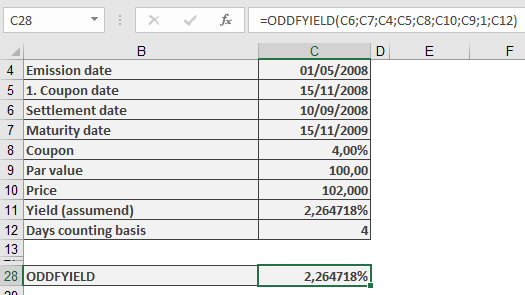
The sample files include a fictitious bond with a shortened first interest period, The yield is derived iteratively (via goal-seek) to match the target price. ODDFYIELD() returns identical results.
How to use the ODDFPRICE() function in Excel
Calculates the price of a fixed-interest security, accounting for a first interest period that is either shorter or longer than subsequent regular periods (quarterly, semi-annual, or annual).
Syntax
ODDFPRICE(Settlement; Maturity; Issue; First_Interest_Date; Rate; Yield; Repayment; Frequency; [Basis])
Arguments
- Settlement (required) – The date the security is transferred to the buyer.
- Maturity (required) – The date the security’s principal is repaid.
- Issue (required) – The issuance date of the security.
- First_Interest_Date (required) – The date of the first interest payment.
- Rate (required) – The bond’s nominal annual interest rate (coupon rate).
- Yield (required) – The market yield for bonds of the same maturity.
- Repayment (required) – The redemption value per 100 units of par value.
- Frequency (required) – Number of interest payments per year (1 = annual, 2 = semi-annual, 4 = quarterly).
- Basis (optional) – Day-count convention . Defaults to 0 if omitted.
Notes
- Dates must be entered without time values; decimals are truncated.
- Frequency and Basis are truncated to integers.
- If dates are invalid, #VALUE! is returned.
- Yield and Repayment must be non-negative; otherwise, #NUM! is returned.
- If Frequency is not 1, 2, or 4, or Basis is outside 0–4, #NUM! is returned.
- The chronological order must be:
Maturity > First_Interest_Date > Settlement > Issue; otherwise, #NUM! is returned.
Background
The function applies the financial principle:
Creditor’s Payment = Debtor’s Payment
At the transaction’s start, the security’s price plus accrued interest equals the present value of future cash flows (interest + principal). The price is expressed as a percentage of par (e.g., 100 units).
Calculating present value is straightforward if:
- The settlement coincides with an interest payment date, and
- Interest is paid annually.
However, complexities arise with:
- Settlement between interest dates, or
- Multiple annual payments.
Finance mathematics uses various methods (e.g., Moosmüller, Braess/Fangmeyer, ISMA) to handle partial periods. For ISMA compatibility with Excel, see the PRICE() and YIELD() background notes.
Formula (Simplified Case)
For annual payments (360-day year) and a shortened first period, the formula in Excel Help reduces to:
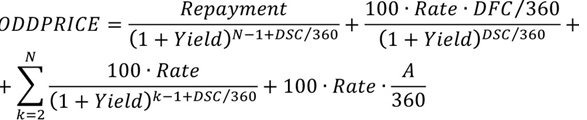
Formula variables:
- N = Total interest periods,
- A = Days from issue to settlement,
- DSC = Days from settlement to first interest date,
- DFC = Days from first interest date to maturity.]
Unlike PRICE(), the first period is treated separately (not summed with others) because its coupon is partial.
For Frequency > 1, Rate and Yield are adjusted for intra-year periods.
For lengthened first periods, the formula accounts for hypothetical interim interest payments realized at the period’s end. Accrued interest is handled similarly.
Note: The function is irrelevant once the first interest date passes.
Example
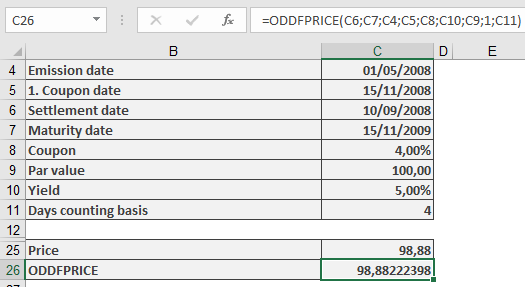
The sample files include a fictitious bond calculation with a shortened first interest period. The result aligns with ODDFPRICE()‘s output.
How to use the NPV() function in Excel
This function calculates the net present value of future period surpluses (cash flows) of an investment based on a given discount rate.
Syntax
NPV(Rate; Value1; Value2; …)
Arguments
- Rate (required) – The discount rate supplied by the investor.
- Value1, Value2, … (required) – The (actual and expected) surpluses from disbursements and deposits, listed in a continuous column. Each value represents the end of a period (typically one year) in ascending order without gaps. Negative surpluses are indicated with a minus sign.
If the cells in the Value argument contain non-numeric data or are empty, Excel treats them as if they do not exist. This also applies if cell references in the argument point to such cells.
Background
Dynamic investment appraisal methods rely on estimated and projected deposits and disbursements and their yields, unlike static methods, which focus on costs and earnings. Both cash inflows and outflows are evaluated using a uniform discount rate derived from the investor’s experience. The sum of all discounted period surpluses is called the net present value (NPV).
An investment is considered financially viable if the NPV is non-negative, meaning the invested capital plus the expected yield is recovered.
The first value in the NPV() function represents the end of the first period. The net present value of an investment is determined by subtracting the initial disbursement (at the start of the first period) from the result of NPV().
Example
When reviewing the following examples, compare them to the explanations for IRR() and its related examples.
Investment in Material Assets
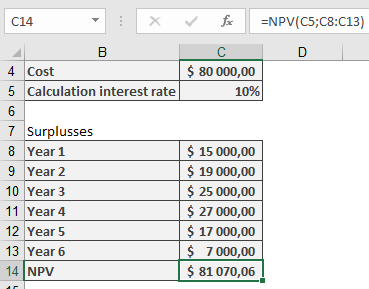
The purchase cost of a machine is $80,000.00. The expected annual surpluses (deposits minus disbursements) are estimated as shown in Table 1.
Table 1. Estimated Annual Surpluses from Machine Usage
Year Surplus (in $) 1 15,000 2 19,000 3 25,000 4 27,000 5 17,000 6 7,000 Is the investment economically sound if a discount rate of 10% p.a. is applied?
To answer this, enter the purchase cost in the first cell and list the surpluses from Table 1 in a continuous column. Using NPV() returns approximately $81,070, slightly exceeding the purchase cost. Thus, the yield is likely marginally better than the expected rate.
Note: Decimal precision may not be critical when dealing with real investments where future surpluses are estimates.
Financial Investment
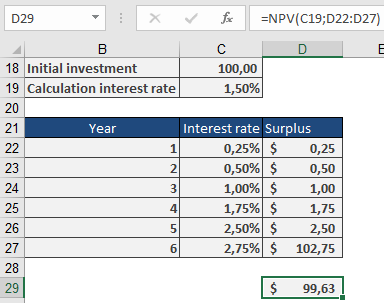
German federal savings bonds (Type A) with the terms as of August 30, 2010 (Table 2) may appear to offer a total yield of around 1.5% at first glance.
Table 2. Terms for Federal Savings Bonds
Duration Year Nominal Interest 2010/2011 0.25% 2011/2012 0.50% 2012/2013 1.00% 2013/2014 1.75% 2014/2015 2.50% 2015/2016 2.75% Sample calculations (available in the function’s example files) show that the net present value for a $100.00 investment is only $99.63. Therefore, investing at this expected yield is not advisable.
How to use the NPER() function in Excel
The NPER() function calculates the duration of a compound interest process, annuity calculation, or repayment plan. It is based on regular payments of the same amount and/or one-time payments at the beginning or end of the period, following the financial mathematical benefit principle:
Payment of the creditor+Payment of the debtor=0Payment of the creditor+Payment of the debtor=0
Syntax:
NPER(Rate, Pmt; Pv; Fv; Type)
Arguments:
- Rate (required) – The (constant) periodic interest rate, expressed as an arrears rate.
- Pmt (required/optional, see Note) – The amount of regular payments (e.g., an annuity).
- Pv (required/optional, see Note) – The present (starting) value of one payment direction.
- For disbursement plans, this is the initial account balance.
- For repayment plans, this is the loan amount.
- Fv (optional/required, see Note) – The desired future value (e.g., a residual balance or final repayment amount).
- Type (optional) – Specifies payment timing:
- 0 or omitted: Payments at the end of each period (default).
- 1: Payments at the beginning of each period.
Background:
The five financial functions—
- PV() (present value),
- FV() (future value),
- PMT() (regular payment),
- NPER() (number of periods),
- RATE() (interest rate)
—are interrelated through the benefit principle equation, where M represents the payment timing (Type).
The present value and periodic payments are compounded, and the sum is compared to the future value. Each function solves for one variable in this equation when the others are known. For RATE(), an approximation method is used.
Examples:
The following examples illustrate common financial applications.
- Compound Interest Calculation
An investor deposits $10,000 at a 4.5% annual interest rate, aiming for $25,000. How long must the money remain invested?
=NPER(4.5%, , -10000, 25000)
Result: 20.82 years (the target is exceeded after 21 years).
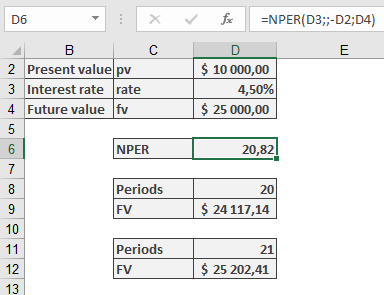
- Verify using FV(4.5%, 20, , -10000) → $24,117.14 (not reached).
- FV(4.5%, 21, , -10000) → $25,202.41 (achieved).
Key Notes:
- For Pmt, Pv, and Fv, ensure at least one is provided (or the calculation is trivial).
- Negative/positive values indicate cash flow direction (outflow vs. inflow).
- Type adjusts the compounding timing for accuracy.
How to use the NOMINAL() function in Excel
This function calculates the nominal interest rate that (mathematically, in finance) results in equivalence to a given effective interest rate.
Syntax:
NOMINAL(Effect_Rate; Periods)Arguments:
- Effect_Rate (required) – The given effective annual interest rate, derived from the compound interest of an intra-annual yield.
- Periods (required) – The number of interest periods per year.
- If the Periods argument contains decimal places, it is truncated to an integer.
- The result must be greater than zero. Otherwise, NOMINAL() returns the #NUMBER! error.
- If either argument is not a numeric expression or if Effect_Rate is not positive, NOMINAL() also returns the #NUMBER! error.
Background:
For various financial transactions (such as mortgage loans, savings accounts, interest on checking accounts, current accounts, and overdraft credits), an annual interest rate is specified but is primarily used for defining further terms. This means interest is paid in intra-annual periods rather than annually. The applied interest rate is determined by dividing the nominal interest rate by the number of periods.To enable comparisons between different terms, the interest rate that yields the same result as intra-annual compounding with a single annual payment is called the effective annual interest rate. The following relationship exists between the two rates:
Effective Rate=(1+Nominal RatePeriods)Periods−1Effective Rate=(1+PeriodsNominal Rate)Periods−1

The NOMINAL() function solves this equation for the nominal interest rate.
Examples:
The following examples demonstrate the use of the NOMINAL() function.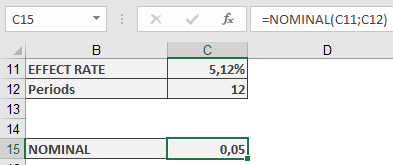
Correlation:
The relationship between nominal and effective interest rates is illustrated in the examples for the EFFECT() function.ISMA Price and ISMA Yield:
In the semi-annual interest payment example for the PRICE() function, the example includes a reconstruction of the ISMA price using Excel’s built-in function. The yield must be converted using NOMINAL().How to use the MIRR() function in Excel
This function calculates the modified internal rate of return (MIRR), evaluating negative cash flows (disbursements) and positive cash flows (deposits) at different interest rates.
Syntax:
MIRR(Values; Investment; Reinvestment)Arguments
- Values (required)
- A range of cash flows (disbursements and deposits) arranged chronologically.
- Each value represents the end of a period (e.g., yearly).
- Must include at least one positive and one negative value.
- Non-numeric or empty cells are ignored.
- Investment (required)
- The discount rate applied to negative cash flows (borrowing cost).
- Reinvestment (required)
- The interest rate applied to positive cash flows (reinvestment yield).
Background
The MIRR method improves upon the standard IRR() by:
- Separate rates for financing (negative flows) and reinvestment (positive flows).
- Eliminating multiple IRR issues that arise with irregular cash flows.
- Providing a realistic reinvestment assumption (unlike IRR, which assumes reinvestment at the IRR itself).
Advantages:
✔ Clear reinvestment rate – Reflects realistic earnings on deposits.
✔ No time horizon limitation – Unlike NPV, which requires a fixed rate.Disadvantages:
✖ Fixed rates – Assumes constant borrowing and reinvestment rates.
Example
An investor buys a 5-year government bond with:
- Annual coupon rate: 4.25%
- Reinvestment rate: 2% (due to market conditions)
IRR vs. MIRR:
Metric Calculation Result IRR() Standard return 4.25% MIRR() Adjusted for reinvestment 4.08% 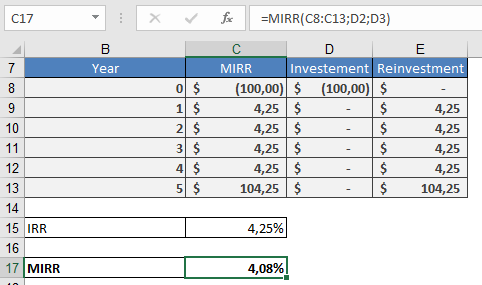
Interpretation:
- Initial investment: $100
- Future value (FV):
- Coupons reinvested at 2% → $122.12 after 5 years.
- MIRR (4.08%) reflects the true annualized return after accounting for lower reinvestment yields.
Key Takeaway
MIRR provides a more realistic measure of profitability by:
- Using separate rates for costs and reinvestment.
- Avoiding the overstated returns of IRR when reinvestment rates differ.
- Values (required)
How to use the MDURATION() function in Excel
This function calculates the modified duration for fixed-interest securities.
Syntax:
MDURATION(Settlemen; Maturity; Nominal_Interest; Yield; Frequency; Basis)Arguments:
- Settlement (required) – The date when ownership of the security is transferred.
- Maturity (required) – The date when the loan (represented by the security) is repaid.
- Nominal_Interest (required) – The annual coupon rate (agreed interest rate) of the security.
- Yield (required) – The market interest rate on the settlement date, used to discount future cash flows in the duration calculation.
- Frequency (required) – The number of interest payments per year. Valid options:
- 1 = Annual
- 2 = Semiannual
- 4 = Quarterly
- Basis (optional) – The day-count convention. If omitted, Excel defaults to Basis = 0.
Notes:
- Date arguments are truncated to integers (no time component).
- Frequency and Basis must be integers (decimal places are truncated).
- Errors:
- #VALUE! – Invalid dates or non-numeric inputs where required.
- #NUM! – Invalid numbers for non-date arguments.
Background:
Modified duration measures a bond’s price sensitivity to interest rate changes, crucial for risk management. Unlike stocks, fixed-income securities see reduced price volatility as maturity nears because redemption value is fixed.Mathematically:
- Duration = Macaulay Duration (see DURATION()).
- MDURATION() returns the scaling factor for estimating relative price change due to interest rate shifts (unsigned).
- For multiple annual payments, the yield is distributed evenly across periods.
Example:
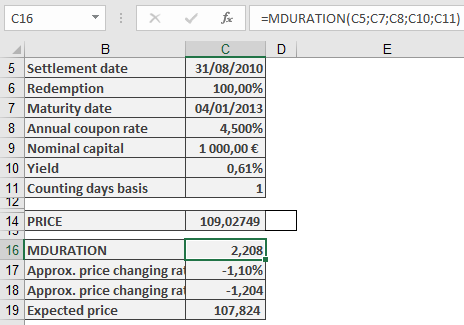
A 4.5% federal bond (issued 2003) had:- Yield (Aug 31, 2010): 0.61%
- Maturity: Jan 4, 2030
- Price: $109.027
Scenario:
- If yield rises +0.5% (to 1.11%), the price drops to $107.800 (–1.13%).
Using MDURATION():
- Modified Duration = 2.208
- Estimated price change = 2.208 × 0.5% ≈ 1.1% decline
- New price ≈ $107.824 (vs. actual $107.800)
Conclusion:
Modified duration helps investors quickly assess risk without complex recalculations.How to use the ISPMT() function in Excel
Calculates the simple interest accrued for a specific period within a year, based on a fixed annual interest rate. Unlike standard compound interest functions, ISPMT() assumes no intra-period compounding.
Syntax
ISPMT(Rate; Per; Nper; Pv)
Arguments
Argument Description Rate Annual interest rate (e.g., 6%). Per Period number (zero-based) or days elapsed (if Nper = 360). Nper Total periods in a year (e.g., 12 for months, 360 for days). Pv Principal amount (use negative for cash outflow, e.g., -100). Key Features
- Simple Interest Only: Interest is linear (no compounding).
- Formula:

- Use Case: Legacy systems (e.g., Lotus 1-2-3 compatibility) or scenarios where compounding is irrelevant (e.g., short-term loans).
Examples
- Savings Account (Monthly Periods)
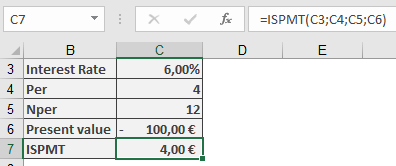
- Deposit: $100 on April 30 (Month 4 of 12).
- Annual Rate: 6%.
- Interest for Remaining Year:
=ISPMT(6%, 4, 12, -100) → **$4.00**
- Daily Interest Calculation
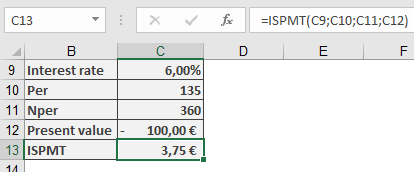
- Deposit: $100 on May 5 (Day 135 of 360).
- Interest for Remaining Year:
=ISPMT(6%, 135, 360, -100) → **$3.75**
Comparison to IPMT()
Feature ISPMT() IPMT() Interest Type Simple (linear) Compound (annuity repayment) Usage Legacy compatibility Modern loan/deposit analysis Periods Zero-based counting One-based counting Limitations
- No Compounding: Not suitable for investments/loans with intra-period compounding.
- Negative Periods: Returns erroneous values if Per ≥ Nper.
How to use the IRR() function in Excel
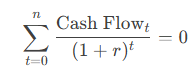
Calculates the Internal Rate of Return (IRR)—the discount rate that makes the Net Present Value (NPV) of a series of cash flows equal to zero.
Syntax
IRR(Values; [Guess])
Arguments
Argument Description Values (required) A range/array of cash flows (negative = outflows, positive = inflows). Must include at least one negative and one positive value. Guess (optional) Initial estimate for IRR (default: 10%). Helps avoid calculation errors in complex cash flows. Key Features
- Purpose: Evaluates profitability of investments/projects.
- Formula: Solves for rr in:
- Limitations:
- May return multiple solutions for irregular cash flows.
- Fails if cash flows are all positive/negative (#NUM! error).
Examples
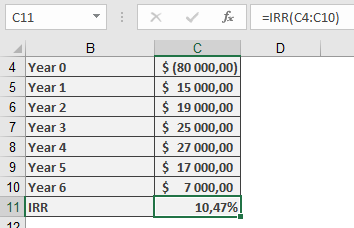
- Machine Investment
- Initial Cost: -$80,000 (Year 0).
- Annual Surpluses:
Year Cash Flow 1 $15,000 2 $19,000 … … 6 $7,000 -
- Calculation:
=IRR(B2:B8) → **10.47%**
-
- Interpretation: IRR (10.47%) > Hurdle Rate (10%) → Viable investment.
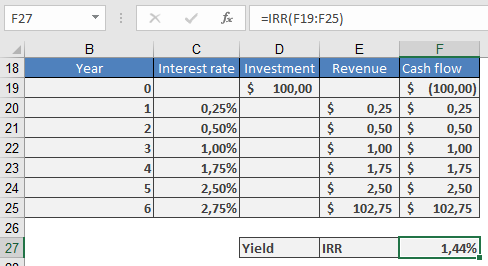
- Federal Savings Bond
- Cash Flows: Fixed annual interest payments.
- Result:
=IRR(C2:C8) → **1.44%**
-
- Note: Matches the German Federal Bank’s published yield.
Practical Tips
- Guess Argument: Use for complex cash flows (e.g., IRR(Values, 5%)).
- Validation: Cross-check with NPV(IRR(Values), Values) ≈ 0.
- Alternatives: Use XIRR() for irregularly timed cash flows.
Common Errors
Error Cause Fix #NUM! No convergence after 20 iterations. Adjust Guess or verify cash flow signs. #VALUE! Non-numeric data in Values. Ensure all inputs are numbers. How to use the IPMT() function in Excel
Its calculates the interest portion of a fixed periodic payment (annuity) for a loan or investment under the annuity repayment method.
Syntax
IPMT(Rate; Per; Nper; Pv; [Fv]; [Type])
Arguments
Argument Description Rate (required) Periodic interest rate (e.g., 5.5%/12 for monthly payments). Per (required) Specific period number (e.g., 18 for the 18th payment). Nper (required) Total number of payment periods (e.g., 30*12 for a 30-year loan). Pv (required) Present value (loan principal). Fv (optional) Future value (residual value after Nper). Default: 0. Type (optional) 0 = end of period (default), 1 = start of period. Key Features
- Annuity Repayment: Payments combine interest (decreasing over time) and principal (increasing over time).
- Formula:
Interest in Period=Remaining Principal×RateInterest in Period=Remaining Principal×Rate
- Sign Convention:
- Negative result: Cash outflow (e.g., loan interest paid).
- Positive result: Cash inflow (e.g., interest earned on investments).
Example
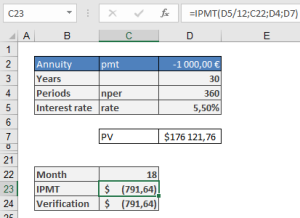
Loan Repayment Calculation
- Loan Amount (Pv): $176,121.76
- Annual Rate: 5.5% → Monthly Rate: 5.5%/12
- Term: 30 years → 360 months (Nper = 30*12)
- 18th Month Interest:
=IPMT(5.5%/12, 18, 360, 176121.76) → **-$791.64**
(Interest paid in the 18th month)
Practical Notes
- Rounding Errors:
- Banks round to 2 decimal places. Use ROUND(IPMT(…), 2) for accuracy.
- Full Payment Plan:
- Combine with PPMT() (principal portion) to verify total payment:
=IPMT(Rate, Per, Nper, Pv) + PPMT(Rate, Per, Nper, Pv) = PMT(Rate, Nper, Pv)
- Type Matters:
- For leases/advance payments, set Type=1.
Comparison to Related Functions
Function Purpose PMT() Total periodic payment (interest + principal). PPMT() Principal portion of payment. CUMIPMT() Cumulative interest over multiple periods.