Votre panier est actuellement vide !
Étiquette : financial-function
How to use the RECEIVED() function in Excel
Its calculates the maturity value (redemption amount) for a fully discounted security that uses anticipative interest calculation (interest deducted upfront).
Syntax
RECEIVED(Settlement; Maturity; Investment; Discount; [Basis])
Arguments
Argument Required Description Validation Rules Settlement Yes Trade settlement date Must be valid date ≤ Maturity Maturity Yes Security maturity date Must be valid date ≥ Settlement Investment Yes Amount invested (purchase price) > 0 Discount Yes Annual discount rate > 0 [Basis] No Day count convention (0-4) Default=0 Error Conditions
- #VALUE!: Invalid dates or non-numeric inputs
- #NUM!: Negative amounts or invalid Basis
Key Features
- Anticipative Interest Model:
- Interest deducted at inception (discount instrument)
- Contrasts with standard arrears interest calculation
- Common Applications:
- Treasury bills
- Commercial paper
- Bankers’ acceptances
Calculation Method
Maturity Value = Investment / (1 – (Discount × DSM/DIM))
Where:
- DSM = Days from settlement to maturity
- DIM = Days in year per Basis convention
Examples
- Bill of Exchange
Scenario:
- Settlement: 10-May-2010
- Maturity: 10-Jul-2010 (2 months)
- Investment: $4,958.33
- Discount: 5% p.a.
- Basis: 4 (European 30/360)
Calculation:
=RECEIVED(« 5/10/2010″, »7/10/2010 »,4958.33,5%,4)
Result: $5,000.00
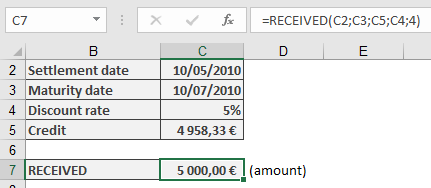
Face value of the billImportant Notes
- Day Count Conventions:
Basis Method 0 US (NASD) 30/360 1 Actual/actual 2 Actual/360 3 Actual/365 4 European 30/360 - Financial Context:
- Primarily for short-term instruments (<1 year)
- Represents the face value calculation
- Complementary to PRICEDISC() which calculates purchase price
- Implementation Tip:
For precise institutional calculations:
=ROUND(RECEIVED(…), 2)
Related Functions
- PRICEDISC(): Calculates purchase price from face value
- YIELDDISC(): Determines equivalent yield
- INTRATE(): Calculates the interest rate
How to use the RATE() function in Excel
Its calculates the periodic interest rate for a loan or investment based on constant periodic payments and/or a lump sum amount.
Syntax
RATE(Nper; Pmt; Pv; [Fv]; [Type]; [Guess])
Arguments
Argument Requirement Description Financial Context Nper Required Total number of periods Loan term/investment horizon Pmt Conditionally Required Payment per period Annuity amount Pv Conditionally Required Present value Loan principal/initial investment [Fv] Optional Future value Target balance/residual value [Type] Optional Payment timing:
0 = end period (default)
1 = beginning periodCash flow timing [Guess] Optional Starting guess for iterative calculation (default=10%) Initial estimate Note: Either Pmt or Fv must be provided.
Calculation Method
Uses iterative approximation to solve the time value of money equation:
Pv + Σ[Pmt/(1+Rate)^k] + Fv/(1+Rate)^Nper = 0
where k ranges from 1 to Nper (adjusted for Type).
Key Applications
- Investment Yield Analysis
- Loan Interest Determination
- Annuity Rate Calculation
- Capital Budgeting (IRR alternative)
Examples
- Retirement Savings Target
Scenario:
$10,000 growing to $25,000 in 15 years.Calculation:
=RATE(15,,-10000,25000)
Result: 6.3% p.a.
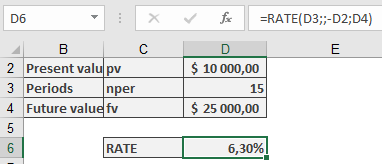
Required annual return to meet goal.- Pension Annuity Funding
Scenario:
$100,000 fund providing $750/month for 15 years (payments at start of month).Calculation:
=RATE(15*12,-750,100000,,1)
Result: 0.3548% monthly (4.26% p.a.)
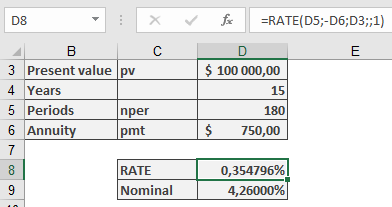
Required monthly compounding rate.- Mortgage Pricing
Scenario:
$175,000 loan with $1,000 monthly payments over 30 years.Calculation:
=RATE(30*12,-1000,175000)
Result: 0.4632% monthly (5.56% p.a.)
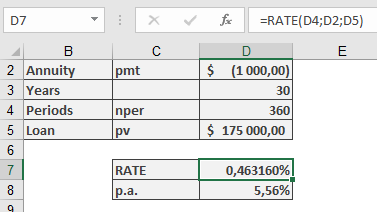
Effective annual interest rate.Technical Notes
- Iterative Process:
- Begins with Guess value (default 10%)
- Uses Newton-Raphson approximation
- May fail to converge if no solution exists
- Complementary Functions:
- IRR(): For irregular cash flows
- XIRR(): For irregular dates
- NPER(): For term calculations
- Financial Best Practices:
- For monthly results, multiply by 12 for APR
- Use negative values for cash outflows
- Combine with ROUND() for presentation:
=ROUND(RATE(…)*12,2)& »% p.a. »
How to use the PV() function in Excel
Its calculates the present value of an investment based on a constant interest rate and a series of future payments (annuities) and/or a lump sum.
Syntax
PV(Rate; Nper; [Pmt]; [Fv]; [Type])
Arguments
Argument Requirement Description Financial Meaning Rate Required Interest rate per period Cost of capital/discount rate Nper Required Total number of periods Investment/loan term [Pmt] Conditionally Required Payment per period Annuity amount [Fv] Optional Future value Target balance/residual value [Type] Optional Payment timing:
0 = end period (default)
1 = beginning periodCash flow timing Note: Either Pmt or Fv must be provided.
Financial Model
Implements the time value of money principle:
PV + Σ[Pmt/(1+Rate)^k] + Fv/(1+Rate)^Nper = 0
where k ranges from 1 to Nper (adjusted for Type).
Key Applications
- Lump Sum Investments (Retirement Planning)
=PV(Rate, Nper,, Fv)
- Annuity Valuation (Pension Planning)
=PV(Rate, Nper, Pmt)
- Loan Capacity (Mortgage Underwriting)
=PV(Rate, Nper, -Pmt)
Examples
- Retirement Savings Verification
Scenario:
$10,000 invested for 15 years at 5% p.a. targeting $25,000.Calculation:
=PV(5%, 15,, 25000)
Result: -$12,025.43
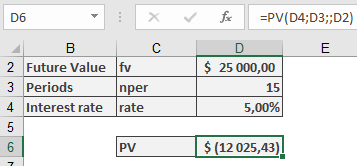
Interpretation: Requires $12,025 initial investment to reach target (current $10,000 insufficient).- Mortgage Qualification
Scenario:
$1,000 monthly payment capacity for 30 years at 5.5% p.a.Calculation:
=PV(5.5%/12, 30*12, -1000)
Result: $176,121.76
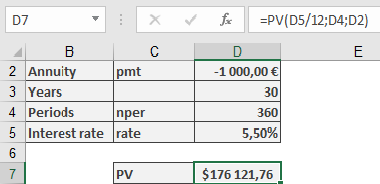
Interpretation: Maximum loan amount at given terms.Important Notes
- Sign Convention:
- Positive results = Cash inflows
- Negative results = Cash outflows
- Compounding Assumptions:
- For monthly payments, divide annual rate by 12
- For quarterly payments, divide annual rate by 4
- Precision Tip:
For loan amortization schedules, combine with ROUND():
=ROUND(PV(…), 2)
How to use the PRICEMAT() function in Excel
Its calculates the price per 100 currency units of face value for a security that pays simple interest at maturity (no compounding).
Syntax
PRICEMAT(Settlement; Maturity; Issue; Rate; Yield; [Basis])
Arguments
Argument Requirement Description Validation Rules Settlement Required Trade date Must be valid date < Maturity maturity Required Maturity date Must be valid date > Settlement issue Required Security issuance date Must be valid date ≤ Settlement rate Required Annual coupon rate ≥ 0 yield Required Annual market yield ≥ 0 [basis] Optional Day count convention (0-4) Default=0 Error Conditions
- #VALUE!: Invalid dates
- #NUM!: Negative rates/yields or Basis ∉ {0,1,2,3,4}
Key Features
- Simple Interest Model:
- Interest calculated linearly (no compounding)
- Appropriate for short-term instruments
- Price Components:
- Principal repayment at maturity
- Full-term interest payment
- Discounted at market yield
Calculation Method
Price = [Repayment + (Rate × DIM/YearDays)] / (1 + Yield × DSM/YearDays) – Accrued Interest
Where:
- DIM = Days from issue to maturity
- DSM = Days from settlement to maturity
- YearDays = Days in year per Basis
Example
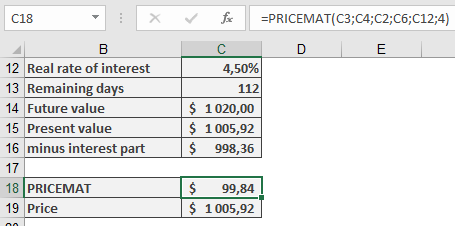
Important Notes
- Day Count Conventions:
- 0 = US (NASD) 30/360
- 1 = Actual/actual
- 2 = Actual/360
- 3 = Actual/365
- 4 = European 30/360
- Financial Applications:
- Commercial paper
- Short-term notes
- Certificates of deposit
- Complementary Functions:
- ACCRINT(): Calculates accrued interest
- YIELDMAT(): Determines equivalent yield
- Implementation Tip:
For precise institutional calculations:
=ROUND(PRICEMAT(…),2) + ROUND(ACCRINT(…),2)
How to use the PRICEDISC() function in Excel
Its calculates the price per $100 face value of a discounted security that uses anticipative interest (discount interest applied upfront).
Syntax
PRICEDISC(Settlement; Maturity; Disc; Repayment; [Basis])
Arguments
Argument Requirement Description Validation Settlement Required Trade settlement date Valid date ≤ Maturity Maturity Required Security maturity date Valid date ≥ Settlement Disc Required Annual discount rate > 0 Repayment Required Redemption value per $100 face value > 0 [Basis] Optional Day count convention (0-4) Default=0 Error Conditions
- #VALUE!: Invalid dates or non-numeric inputs
- #NUM!: Negative rates or invalid Basis
Key Features
- Uses anticipative interest model:
- Interest deducted upfront (disagio)
- Contrasts with standard arrears interest
- Common applications:
- Treasury bills
- Commercial paper
- Bankers’ acceptances
Calculation Method
Price = Repayment × (1 – Disc × DSM/DIM)
Where:
- DSM = Days from settlement to maturity
- DIM = Days in year per Basis convention
Examples
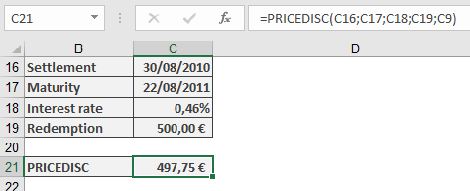
- German Treasury Bond
Terms:
- Face value: €500
- Settlement: 30-Aug-2010
- Maturity: 22-Aug-2011
- Discount: 0.46%
- Basis: 1 (actual/actual)
Calculation:
=PRICEDISC(« 30/8/2010″, »22/8/2011 »,0.46%,500,1)
Result: €497.75
Equivalent Yield Calculation:
=RECEIVED(« 30/8/2010″, »22/8/2011 »,497.75,500,1)
Returns: 0.46% (matches Bundesbank published rate)
Important Notes
- Day Count Conventions:
- Basis 0: US (NASD) 30/360
- Basis 1: Actual/actual
- Basis 2: Actual/360
- Basis 3: Actual/365
- Basis 4: European 30/360
- Financial Context:
- Primarily for short-term instruments (<1 year)
- Low-yield environments may show minimal price differences
- For precise institutional calculations, verify day count rules
- Complementary Functions:
- YIELDDISC(): Calculates equivalent yield
- RECEIVED(): Determines maturity amount
How to use the PRICE() function in Excel
This function calculates the price of a fixed-income security (loan), meaning the purchase price excluding any accrued interest.
Syntax.
PRICE(Settlement; Maturity; Rate; Yield; Redemption; Frequency; Basis)Arguments
- Settlement (required): The date on which the ownership of the security changes.
- Maturity (required): The date on which the loan represented by the security is repaid.
- Rate (required): The agreed-upon annual interest rate for borrowing the money.
- Yield (required): The market interest rate on the settlement date, used to discount all future payments during the calculation of the term.
- Redemption (required): The percentage of the par value of the security (assuming a nominal value of 100 monetary units) repaid at maturity.
- Frequency (required): Specifies the number of coupon payments per year. Accepted values:
- 1 = annual,
- 2 = semiannual,
- 4 = quarterly.
- Basis (optional): Defines the day count basis according to Table 15-2 referenced earlier. If omitted, Excel uses Basis = 0.
Requirements for PRICE() Arguments:
- Dates must not contain time values; decimals are truncated.
- Frequency and Basis are truncated to integers.
- If a date argument is invalid, the function returns the #NUM! error.
- Rate and Yield must be non-negative. Redemption must be positive. Otherwise, PRICE() returns the #VALUE! error.
- If Frequency is not 1, 2, or 4, or if Basis is not between 0 and 4, or if the Settlement date is later than Maturity, the function returns #NUM!.
Background.
To apply the financial principle of equivalence:
Payment by creditor = Payment by debtorAt the beginning of the transaction, the price of a fixed-income security (loan) plus accrued interest equals the present value of the debtor’s future payments stipulated by the security. The price represents a percentage of the security’s par value, assuming a par value of 100 monetary units.
When the purchase date coincides with the interest payment date for a security with annual interest payments, calculating the present value is straightforward—only the full year needs consideration. However, when ownership changes between coupon dates or when multiple coupon payments occur per year, the calculation becomes more complex. Several financial methods address this, with the most notable being Moosmüller, Braess/Fangmeyer, and ISMA (International Securities Market Association, formerly Association of International Bond Dealers, AIBD).
The ISMA method yields the same result as PRICE() for annual payments and can be adapted for semiannual and quarterly payments using the PRICE() function.
Excel Approach:
In Excel and related functions, cash value creation (discounting future payments) is performed as follows: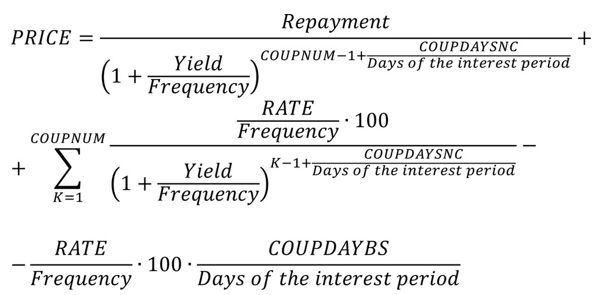
- COUPNUM: Number of coupon payments remaining after settlement.
- COUPDAYSNC: Number of days until the next coupon payment.
- COUPDAYBS: Number of days since the last coupon payment.
When Frequency = 1, this formula aligns with the ISMA method. For Frequency values of 2 or 4, Excel assumes an even distribution of Yield over the year’s periods. In contrast, the ISMA method uses a more complex period apportionment based on the relationship between nominal and effective interest, as explained in the EFFECT() and NOMINAL() function descriptions.
Thus, for multiple coupon payments per year, you can use PRICE() to calculate the ISMA price—but you must first convert the effective yield to a nominal yield using NOMINAL().
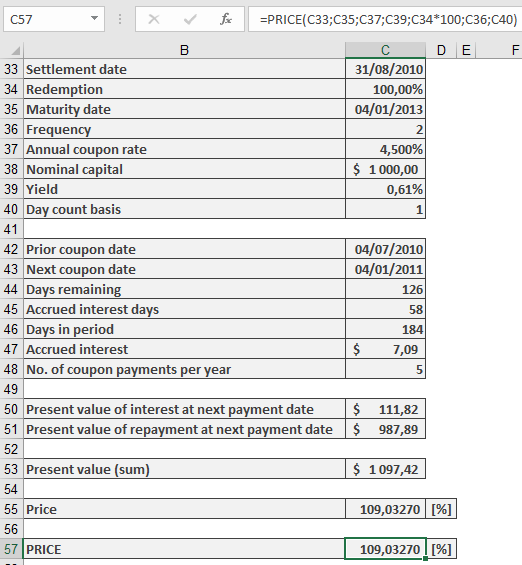
Example.
How to use the PPMT() function in Excel
Its calculates the principal payment portion of a fixed payment (annuity) for a specific period of an investment or loan with constant payments and interest rate.
Syntax
PPMT(Rate; Per; Nper; Pv; [Fv]; [Type])
Arguments
Argument Requirement Description Rate Required Interest rate per period Per Required Period number for which to calculate principal payment (1 to Nper) Nper Required Total number of payment periods Pv Required Present value (total loan amount) [Fv] Optional Future value/remaining balance after last payment (default=0) [Type] Optional Payment timing: 0=end of period (default), 1=beginning Background
In annuity-based loan repayment:
- Each payment contains:
- Principal portion (increases over time)
- Interest portion (decreases as loan balance reduces)
- First period principal = Payment – (Loan amount × Period interest rate)
- Subsequent principal amounts grow geometrically by:
(First principal) × (1 + Rate)^(Period-1)
Example
Loan Scenario:
- Amount: $176,121.76
- Term: 30 years (360 months)
- Rate: 5.5% annual (0.4583% monthly)
- Payment: $1,000/month
18th Month Calculation:
=PPMT(5.5%/12, 18, 30*12, -176121.76)
Returns: $208.36 principal portion
(Interest portion = $1,000 – $208.36 = $791.64)
Important Notes
- Rounding Considerations:
- Bank calculations use 2 decimal places
- For precise amortization schedules, wrap in ROUND():
=ROUND(PPMT(…), 2)
- Sign Convention:
- Negative Pv returns positive principal (cash inflow to borrower)
- Payment amounts are typically negative (cash outflow)
- Data Validation:
- Ensure Per ≤ Nper
- Match Rate to payment frequency (annual rate/12 for monthly)
- Each payment contains:
How to use the PMT() function in Excel
Calculates the periodic payment amount (annuity) for a loan or investment based on constant payments and a constant interest rate. For loan repayment calculations, this represents the fixed payment amount that includes both principal and interest.
Syntax
PMT(Rate; Nper; Pv; [Fv]; [Type])
Arguments
Argument Requirement Description Rate Required Periodic interest rate (typically annual rate divided by periods per year) Nper Required Total number of payment periods Pv Required Present value (loan amount or initial investment) [Fv] Optional Future value (desired balance after last payment) [Type] Optional Payment timing: 0=end of period (default), 1=beginning of period Note: Either Pv or Fv must be specified.
Background
The PMT() function is part of a financial function family that includes:
- PV() (present value)
- FV() (future value)
- NPER() (number of periods)
- RATE() (interest rate)
These functions are interrelated through the financial equation:
[Financial equation graphic showing relationship between PV, FV, PMT, NPER, RATE]Where:
- All values are compounded
- M represents the Type parameter (payment timing)
- The equation is solved for each respective function
Examples
- Annuity Calculation (Retirement Planning)
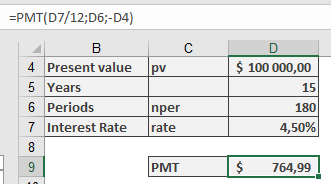
A 60-year-old has $100,000 saved and wants monthly payments for 15 years at 4.5% annual interest.
Scenario A: Exhaust all capital
=PMT(4.5%/12, 15*12, -100000)
Result: $764.99 per month
Scenario B: Maintain $10,000 balance
=PMT(4.5%/12, 15*12, -100000, 10000)
Result: $725.99 per month
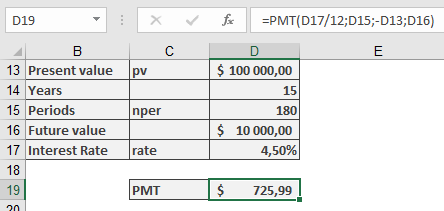
Note: Negative Pv indicates outgoing payment (capital invested)
- Loan Repayment Calculation
$100,000 loan at 5.5% annual interest with 5-year term and $80,000 residual balance.
=PMT(5.5%/12, 5*12, 100000, -80000)
Result: $748.69 per month (negative indicates outgoing payment)
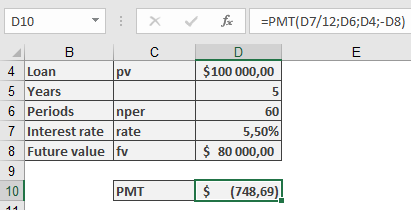
Key Differences:
- Savings calculations assume compound interest
- Mortgage loans typically use simple monthly interest (annual rate/12)
Important Notes
- For loans, payments are negative (cash outflow)
- Interest rates should match payment periods (annual rate/12 for monthly payments)
- Type parameter significantly affects beginning/end of period calculations
- Results are theoretical for accounts without true compound interest
How to use the ODDLYIELD() function in Excel
Its calculates the yield of a fixed-interest security with an irregular final interest period (different length from previous regular periods), using simple interest (no compounding).
Syntax
ODDLYIELD(Settlement; Maturity; Last_Interest_Date; Rate; Price; Repayment; Frequency; [Basis])
Arguments
Parameter Requirement Description Settlement Required Date of bond ownership transfer Maturity Required Date of principal repayment Last_Interest_Date Required Date of last regular interest payment before purchase Rate Required Nominal annual interest rate (coupon rate) Price Required Bond price as percentage of par value (par = 100) Repayment Required Redemption value percentage (per 100 par value) Frequency Required Annual payment frequency (1, 2, or 4) [Basis] Optional Day-count convention (0-4, default=0) Validation Rules
- Date Handling:
- Time values are ignored (truncated)
- Invalid dates return #NUM! error
- Required sequence: Maturity > Settlement > Last_Interest_Date
- Numerical Requirements:
- Rate ≥ 0, Price ≥ 0 (else #NUM!)
- Frequency ∈ {1,2,4}
- Basis ∈ {0,1,2,3,4}
Background
This function complements ODDLPRICE(), calculating the effective yield needed to achieve a specified market price. It uses simple yield methodology (no compounding) where:
- Annual yield is derived from partial period calculations
- Interest at maturity includes accruals since last payment date
- Accrued interest is prorated based on time elapsed
Calculation Method
The yield is determined by:
- Solving the price formula for yield
- Annualizing partial period results
- Prorating interest between last payment and settlement
Example
Sample files demonstrate calculation for bonds with irregular final periods:
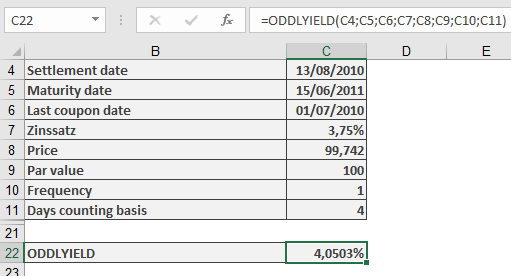
Error Conditions
Error Trigger Condition #NUM! Invalid dates, negative values, or parameter constraints violated #VALUE! Non-numeric arguments Note
Function is only applicable during the final irregular period before maturity.
- Date Handling:
How to use the ODDLPRICE() function in Excel
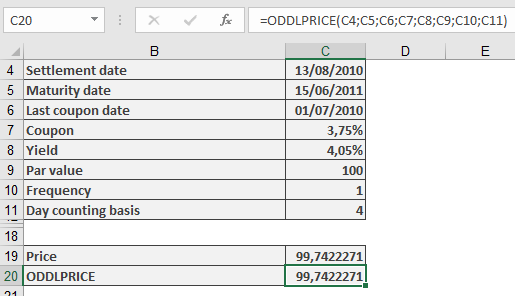
Its calculates the price of a fixed-interest security with a final interest period that differs in length from previous regular periods, without considering compound interest.
Syntax
ODDLPRICE(Settlement; Maturity; Last_Interest_Date; Rate; Yield; Repayment; Frequency; [Basis])
Arguments
- Settlement (required): Date when ownership of the bond transfers to buyer
- Maturity (required): Date when principal repayment occurs
- Last_Interest_Date (required): Date of last regular interest payment
- Rate (required): Bond’s nominal annual interest rate (coupon rate)
- Yield (required): Market interest rate for bonds of equivalent duration
- Repayment (required): Redemption value as percentage of par value (where par = 100)
- Frequency (required): Interest payments per year (1=annual, 2=semi-annual, 4=quarterly)
- Basis (optional): Day-count convention (see Table 15-2). Defaults to 0 if omitted.
Notes
- Date inputs must not include time values; decimal places are truncated
- Frequency and Basis are converted to integers
- Invalid dates return #NUM! error
- Rate and Yield must be non-negative; otherwise returns #NUM!
- Returns #NUM! if:
- Frequency is not 1, 2, or 4
- Basis is outside 0-4 range
- Chronological order is violated: Maturity > Settlement > Last_Interest_Date
Background
The function applies the financial principle:
Creditor’s Payment = Debtor’s PaymentAt transaction initiation:
- Security price + accrued interest = Present value of future cash flows
- Price is expressed as percentage of par value (100 units)
Calculation is straightforward when:
- Settlement coincides with interest payment date, and
- Interest is paid annually
Complexities arise when:
- Settlement occurs between interest dates, or
- Multiple annual payments exist
Common financial methods for partial periods include:
- Moosmüller
- Braess/Fangmeyer
- ISMA (see PRICE() and YIELD() background for Excel-ISMA correlation)
Calculation Method
Excel uses simple yield (no compounding) with these principles:
- Accrued interest calculated from days since last interest payment
- Partial yield derived from days to maturity (based on year length)
- Only applicable during final period before maturity
Example
Sample files include a fictitious bond calculation matching the logic, demonstrating:
- Terms with irregular final period
- Price calculation methodology
- Identical results to ODDLPRICE() function output